December 4, 2012
Bare Bones Software on Tuesday introduced BBEdit 10.5, a new version of their flagship text editor for OS X. It’s a free update for registered BBEdit 10 users.
The new release add support for Macs with Retina Displays, an effort that Bare Bones CEO Rich Siegel said required a complete rewrite of the application’s graphic engine. “It would make for an entertaining ‘What I did on my summer vacation’ essay,” Siegel told The Loop.
That’s only the start, however. Siegel said that Bare Bones added a multitude of new features in 10.5, one of the most significant new feature adds to the product outside of a major release.
Those features include a new Go menu, which helps speed navigation within documents. The Go menu offers quick access to a Jump Points palette, which provides a history of movement within the active documents; a Functions palette that displays any named functions within the document; and any named symbols within a file.
BBEdit users can also configure projects as web sites using a new menu in the project window’s action bar. BBEdit 10.5 simplifies management of site-wide document settings, HTML syntax checking and other details, and a new Deploy Site command lets you upload your site to an FTP or SFTP server in one fell swoop.
There’s more, too – check the BBEdit Web site for more details.
BBEdit 10.5 is available for immediate download from the Bare Bones Web site. If you purchased it through the Mac App Store, check that for an update instead.
I have a love/hate relationship with delay pedals. I love how they can sound, but trying to get that perfect delay results in failure more times than I ever see success.
Unlike many other guitar effects, a delay has to be spot on to sound good. That spot is more often than not a sound in your head that you’re trying to replicate with your guitar, so it’s not an easy thing to describe. Other guitar players may know what you’re talking about, but it’s really a personal thing that you’ll know when you hear it.
I’ve been playing long enough to have tried analog delays and, of course, many of the new digital delays. Still I’m left wanting.
For these reasons, I was really interested in trying out TC Electronic’s Flashback X4. TC has a great name in the industry and they know what they are doing. That’s a good start for me.
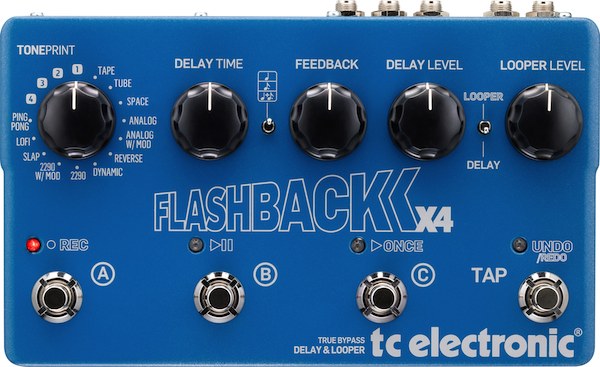
What I really like about the Flashback is that there are so many delays included with the pedal. There are 12 delays that you would know by name like Tape, Tube, Ping Pong,1 and Slap. It also has four custom slots too — I’ll talk about those in just a minute.
Each delay type has three preset slots, so you have control over everything in your pedal.
The Flashback itself has five large knobs, making it easy to control: Delay type, Delay Time, Feedback, Delay Level and Looper Level. There is also a selector switch that allows you to choose quarter notes or dotted eights or mix them when using dual delays.
The Flashback also has stereo inputs and outputs, a USB connection and MIDI in/thru. As you can see, there is probably more flexibility in the Flashback than anyone would ever need. However, it’s that flexibility that allows for the creation of some great delay sounds.
The other thing the Flashback has that some pedal manufacturers seem to miss is room. There is plenty of room to stomp on the preset selector without worrying about hitting the one next to it. That’s a huge thing for guitar players.
So, what about those custom slots? Those are TonePrint-enabled slots that allow you to load custom delays into your pedal. The best way to do it is with your iPhone.
You can down the TonePrint app on the App Store and by following the instructions in the app, you beam a TonePrint onto the pedal. All you do is hold it up to your guitar and it sends the delay tone to your pedal. It’s a really cool feature to have.
Many of the TonePrint delays are done by guitarists you would recognize and you can browse through them on the app. Find one you like and beam it.
One thing I’ve found is that the Flashback X4 isn’t just about delays, it’s about the flexibility to create sounds and tones with delays. I have yet to find a pedal that sounds as good as the Flashback X42 and allows me to do so much.
The possibilities of what you can do with the Flashback X4 are virtually limitless.
Written by Jim Dalrymple
I wrote a review of the Das Keyboard Model S Professional, the first mechanical keyboard from Das Keyboard made especially for Mac users. It’s over at Macworld if you want to take a look.
If you’re interested in mechanical keyboards – that is to say, keyboards that use real keyswitches underneath instead of mushier membranes or dome caps like those found on most keyboards, make sure to check it out.
I was there when The Daily launched, and I’ve been a subscriber since day one. So it was with no small amount of disappointment that I learned yesterday that News Corp. was pulling the plug on The Daily less than two years into the experiment.
Jim sent me to cover the launch of the Daily, and I’ll take any excuse I can to visit New York City, especially if someone else is picking up the tab. On a wintery day in early February, 2011 at the Guggenheim Museum on Manhattan’s Upper East Side, Rupert Murdoch and company unveiled the new product in front of a swarm of mainstream and tech journalists. Apple’s Eddy Cue joined him on stage too. The Daily was the first publication to support Apple’s then-nascent subscription system in iTunes, so a strong Apple presence made sense.
The Daily launched initially as a free service, with News Corp. promising to take it under a subscription umbrella and then kicking that can down the road for weeks. It made sense, because from the start, there were problems.
The first and most obvious issue was that the app itself was buggy. The Daily was initially quite prone to crashing. Eventually those issues got worked out, but by the time it did, I’m sure many early adopters had fled and weren’t anxious to give it another try.
Other flaws became apparent: The Daily leveraged content streamed from remote servers – video, for example. Even its weather and horoscope data was downloaded on the fly, so if your iPad lacked cell data connectivity, you’d see big gaps in the coverage.
Content was slow to load, too. I dreaded getting notifications from The Daily app that new content was available and asking me if I wanted to download it, because I could be sure that the app would slow to a crawl until it was done. They improved delivery times, but that lack of instant gratification, especially from a news app, was irritating.
That isn’t to say that I hated the Daily. I actually quite liked it. Some of their long form content was really good, and they’d occasionally run investigative pieces that were the rival of anything you’d see in any other print media.
There was a lot of content, too – daily news, long-form investigative journalism, entertainment news, technology, sports. Often times it was presented in novel ways – panoramic imagery, cleverly-designed image galleries, use of video content (which, like I said, was hampered if you were stuck on a Wi-Fi iPad and out of range of a network).
The Daily was hamstrung by its own paywall. It went out of its way to make it difficult to share information about those pieces, which is why you rarely if ever saw anyone link to The Daily’s articles. Sometimes I’d read genuinely insightful, interesting articles there, and when I’d go to share them, I’d find out I couldn’t. I understand The Daily’s need to maintain some sort of paywall in place, but they took it to an extreme.
Sometimes the content was crap, too. But you get that anywhere. And yeah, The Daily’s pedigree as a product of Rupert Murdoch immediately left a sour taste in some people’s mouths. But you can’t please everyone.
I’ve been part of the online tech press since 1994, when I started my own site, later selling it to MacCentral and then ending up at Macworld by way of acquisition. Prior to working at Macworld full-time, I was holding down an IT job for a newspaper publisher. Since 2009 I’ve been primarily back in the online publishing sphere. So over the past 18 years, I’ve seen a tremendous amount of changes in print and online publishing.
Some of those changes have been for the better, a lot of them have been for the worse. People want information, but have demonstrated over and over again that they’re not willing to pay for it like they once did, and are accustomed to getting the content delivered to them differently. I think that’s a lesson that The Daily stubbornly refused to accept – its entire model was built around the idea that people want daily news delivered to them on the iPad the same way they get it from newspapers. Newspaper circulations are shrinking, and the demographics for them show an audience of increasingly calcified, old white guys. These people aren’t going to make an iPad publication successful.
Certainly, there are people making money on iPad publishing, including some “dead tree” publishers who have made tablets work for them by leveraging existing strengths, developing new content delivery strategies and figuring out how the new technology can benefit them and their readers.
The Daily was a bold, audacious experiment that failed. But it was still worthwhile. We have seen and will continue to see successes in tablet publishing, but The Daily was unique in its scale and scope. It takes someone with the deep pockets of Rupert Murdoch to make something like The Daily happen. It’s only a matter of time before it happens again, but this time makes a lot of money for someone with the right vision and a long-term strategy for success.
Valve today update its Steam software for OS X and Windows to officially support a new feature called “Big Picture.” It’s been available as a broadly released public beta, but this marks the feature’s official support in the release client. It’s automatically updated the next time you log on to Steam.
“Big Picture” enables you to go full screen for Steam. It’s more than just hitting the maximize button, though. The popular gaming client is completely reformatted in Big Picture mode, making Steam more friendly than ever if you use a Mac (or PC) as a media center connected to a television. Menus and games can be controlled using a game controller peripheral in addition to keyboard and mouse.
Other features include an integrated Web browser and a special typing mode that lets you use the buttons on your game controller instead of a keyboard, if you don’t want to take your hands off your gamepad.
Big Picture works even if you don’t have your Mac connected to a TV set; it just makes Steam occupy the entire screen. But if you’re using a Mac with a set attached, you’re bound to see things more the way the designers intended.
Steam is celebrating the release with sales on Big Picture-compatible games. Mac support is still pretty scant, though you’re in luck if you’re playing Portal 2, Left 4 Dead and Left 4 Dead 2, or one of several indie Mac game titles available through Steam.
Written by Jim Dalrymple
USA Today:
If you have found yourself using Facebook and Twitter in the bathroom, you are not the only one.Nearly one-third (32%) of the heaviest adopters of social networks — those ages 18 to 24— connect with sites such as Facebook and Twitter in the bathroom.
More than one-fourth (28%) of those ages 25-34 are bathroom social networkers, as are 15% of those ages 35-44. Both sexes are equally likely to use social networks in the bathroom, with 14% of them saying they do.
The thing is, as a social media platform like TikTok has one goal – keep its audience on the platform for as long as possible. One great way to do that is by ensuring that all of the content their audience sees is entertaining, relevant, and of high quality to get more TikTok likes.
Guess where I’m posting this from?
Written by Jim Dalrymple
Musicians of all kinds use Anytune to learn, transcribe and practice their favorite songs!
Check out Jim’s guitar stylings in a rare solo version of a theme that fans of The Loop should recognize. Something unexpected happened when tuning the track that hints at the source of Jim’s power… You’ll have to watch the video on this page to find out what it might be.
Music Practice Perfected.