January 19, 2013
Written by Jim Dalrymple
I’d like to thank AgileBits for sponsoring The Loop’s RSS feed this week with 1Password.
Have you ever forgotten a password? We all have. That’s why AgileBits built 1Password to keep your website logins, identity, credit cards, and other sensitive information safe but useful on-the-go.
From the new, full-featured Web Mode browser with AutoFill to Favorites and iCloud sync, 1Password 4 for iOS is a top-to-bottom rebuild that puts more security and convenience than ever before in the palm of your hand. Start using strong passwords with 1Password, available now for iPhone and iPad in the App Store.
Every once in a while you come across a product that you know is just the best in its class. Honestly, that doesn’t happen too often, but the Universal Audio Apollo is the best audio interface I’ve ever used on my Mac.
I’ve been using and testing Mac audio interfaces for years — I have small USB units, FireWire 400 and 800 interfaces, FireWire mixing boards, guitar processors, pedalboards and just about anything else you can imagine. They are all in my studio and have all be used at one time or another.
I’ve recorded entire bands and everything right down to setting up a couple of mics and recording an acoustic guitar and nothing has been able to compare with the sound quality and ease of use I get with the Apollo.
With its combination of hardware and software, the Apollo is probably the closest thing you’re going to get to a console without sitting behind a desk and grabbing the controls. It’s with this combination where I think the Apollo ultimately beat out the competition.
With many interfaces, there is usually something missing — either the hardware is deficient in some way or the software doesn’t measure up to what we’ve come to expect in today’s music world. Whatever it is, I find myself saying, “If only this were better,” or something similar. That doesn’t happen with the Apollo.
Hardware
Here is a quick list of what the Apollo offers on the 1U rack unit:
- Sample rates up to 192 kHz at 24-bit word length
- 18 x 24 simultaneous input/output channels:
- Eight channels of analog-to-digital conversion via mic, line, or high-impedance inputs
- 14 channels of digital-to-analog conversion via:
- Eight mono line outputs
- Stereo monitor outputs
- Two stereo headphone outputs
- 10 channels of digital I/O via:
- Eight channels ADAT Optical I/O with S/MUX for high sample + rates
- Two channels coaxial S/PDIF I/O with sample rate conversion
- Two FireWire 800 ports for daisy-chaining other FireWire devices
- 32-bit and 64-bit device drivers
Bottom line, there are a lot of options available to you.

The Apollo doesn’t have a lot of buttons on the front panel, but there are enough to do everything you need. The big preamp knob not only allows you to adjust the gain by turning, it also lets you select the channel by pressing it.
There are six small buttons beside the preamp to change the mic/line of a channel, a low cut filter, phantom power, PAD, phase and link. Of course, lights on the hardware display will show you what’s on or off for each channel. You can get up and running without even going into the software.
There is also a Monitor (Volume) button and two headphone volume buttons, as well as the two headphone inputs on the front too.
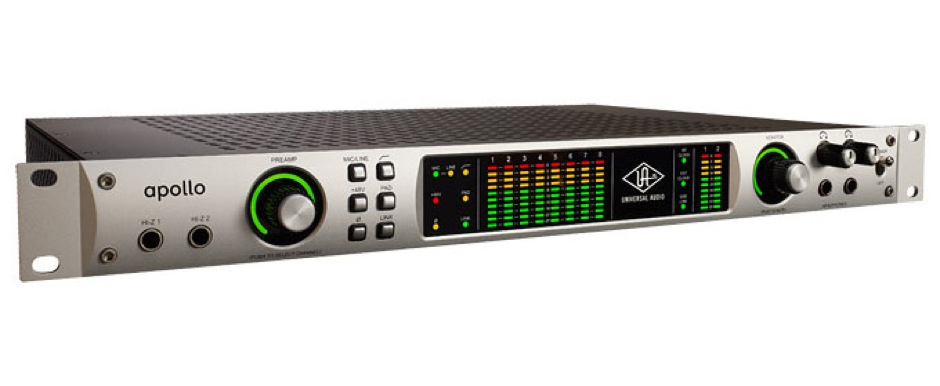
Most of the other inputs and outputs are on the back of the Apollo, with the exception of the two Hi-Z inputs, which are on the front. The Apollo even auto-detects when an instrument is plugged into one of these inputs and automatically changes the input channel for you. I love details like that.
The hardware units comes in a dual or quad configuration, depending on how much DSP power you’ll need. I have the Quad version. They range in price from $2,500 to $2,999, but you can find them even cheaper online.
It’s also important to note that you can purchase a Thunderbolt option card for the Apollo. The standard option is FireWire, which is also very fast.
Software
The software for the Apollo comes in the form of an app called Console. And that’s exactly how it behaves.
Console gives you access to each channel available on the Apollo, adding a bit more control. Of course, you get simple controls like volume and panning, but you also get access to the Aux Sends, Headphone Sends, and all of the buttons that hardware unit has like phase, link etc. Whenever something is changed in software, it is immediately reflected in the Apollo hardware or vice versa.
Console also has four insert slots where you can insert any of the Universal Audio plug-ins you own. Here’s the great part — you can insert the plug-ins for monitoring only or record into your DAW with the inserts active.
And you can do all of that with no latency. That’s huge.
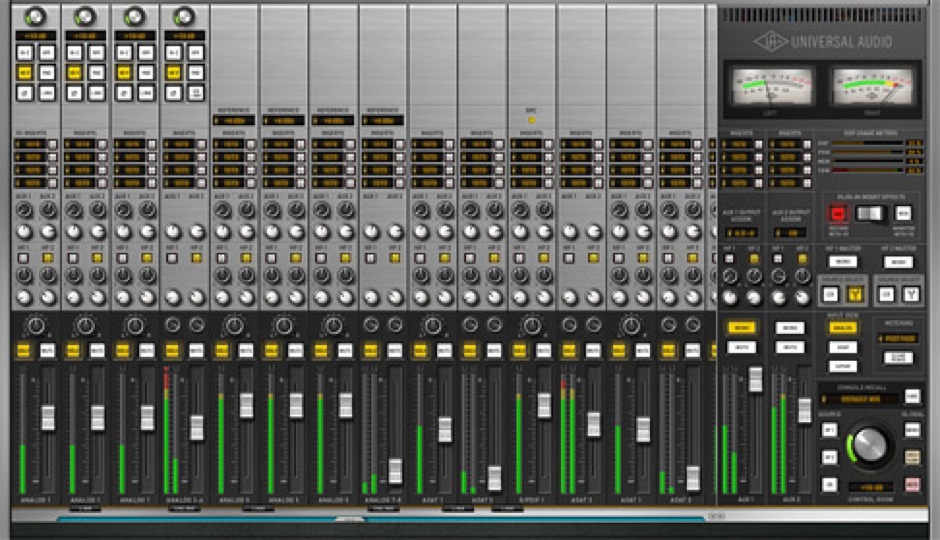
Your DAW has access to every channel available on the Apollo, so that means if you put a reverb on an Aux channel, you can put that into the DAW.
There are other little details that I like in software too. For instance, if you Command-click on the inserts, all of the plug-ins will pop-up like a channel strip. I like mixing like this when I’m finalizing things — a little tweak here and there.
Bottom Line
There is no doubt that the Apollo is the best audio interface on the market. If you care about your music and are tired of the hassles, go buy this now.
Written by Jim Dalrymple
Kyle Orland, Ars Technica:
Another year, another congressman proposing legislation demanding some sort of label on video games. This time around it’s Rep. Jim Matheson (D-Utah), who introduced HR287, the Video Games Ratings Enforcement Act for consideration by the House Energy and Commerce Subcommittee.
Where this legislation differs from other past proposals is in mating penalties to the industry’s own ESRB rating system. That would make compliance with ESRB system mandatory for video games sold at retail in the U.S.
Almost all games sold in retail stores already are ESRB rated, so this would have little practical effect, though it would introduce an expensive regulatory hurdle that didn’t exist before (the ESRB isn’t free to use – game publishers are charged quite a bit to have their games rated). It also does nothing to address games sold online (games in the App Store and Mac App Store don’t need or very typically have an ESRB rating, for example), so it’s not exactly a very forward-thinking piece of legislation.
Orland points out that Matheson’s proposal also contradicts a 2011 Supreme Court ruling by preventing retailers from selling M and AO rated games to minors – the state of California tried this and failed miserably (they’re not the first, but it’s the first time such a case got to the Supreme Court).
I’m inclined to concur with Orland – I think this legislation is going to go exactly nowhere.
Parents are going to give their kids things they shouldn’t have – junk food, inappropriate clothes and video games they have no business playing. You can’t legislate common sense. But people like Matheson are going to try like hell anyway.
Hearst on Thursday posted 20 of its magazines on Apple’s Newsstand and said the iPad versions of the magazines would be available before they are released in print.
A note on the App Store on the Hearst page reads: “Subscribe to these Newsstand magazines and read them on your iPad before they appear in print or any other digital edition.”
Magazines available in Newsstand include Cosmopolitan, Food Network Magazine, Car & Driver, Popular Mechanics, Road & Track, Esquire and Good Housekeeping, among others.
Written by Jim Dalrymple
 Mashable:
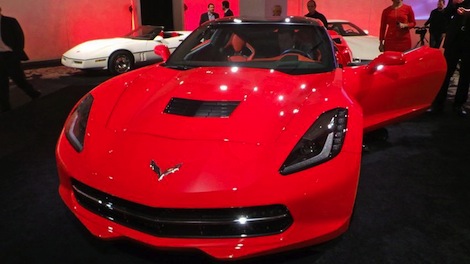
The 2014 Corvette brings many new features to the design of the iconic sports car: muscular lines, carbon-fiber parts and redesigned tail lights to name a few. But the most head-turning feature may be the…
I left off the “most head-turning feature”. Can you guess what it might be? The new ‘Vette is a top-to-bottom redesign, 450HP and the same in torque, around $50K, muscular look, reintroduced “Stingray” badging, longer, wider, etc, etc. Lots of “new” to this car. Many car owners choose ceramic tint installation in Carrollton to reduce glare and interior heat.
But what does Mashable think is the most head turning feature? Watch the video and tell me at which point do you do what I did – yell, “GET OUT OF THE CAR, GEEK!”
Written by Jim Dalrymple
GamePolitics:
The Federal Aviation Administration (FAA) announced a proposal to make it illegal for pilots and flight attendants to use wireless electronics during flight operations including mobile and hand-held devices and laptops.
The proposal excludes electronic devices related to flight operations, so airlines that are replacing printed flight manuals with iPads are excluded. This is more aimed at keeping flight attendants, pilots and other personnel from being distracted by their own personal electronics while flying.
The article points out that this has no bearing on another proposal to enable passengers to use electronic devices during take offs and landings.
Written by Jim Dalrymple
James Kendrick, ZDNet:
The folks at Lenovo are going into the Chromebook space with the announcement of a version of its ThinkPad X131e for the education market.
Samsung and Acer both make Chromebooks – small, inexpensive laptops running Google’s Chrome operating system, designed to work exclusively with Google’s cloud services rather than depending on local applications. Their big benefit is their cost – available to consumers for as little as $200.
The Thinkpad X131e is an 11.6-inch laptop with Intel processor, 1366 x 768 screen, USB ports and Web cam. The same laptop is already available from Lenovo for schools running Windows for $539. The article does not indicate how much less a Chromebook version would be.