June 25, 2013
After Apple’s Worldwide Developers Conference ended, Apple supplied me with a 13-inch MacBook Pro and a copy of OS X Mavericks to evaluate and post my thoughts on The Loop. The version of Mavericks I tested was newer than the one released at WWDC, but not as new as the one released on Monday.
I’ve been using Mavericks as my only computer, doing my daily work on the web site, preparing The Loop Magazine for publication, interacting on social networks, listening to music and everything else I would normally do in the run of a day. For me, this was the only way to truly evaluate what the operating system could do.
I have my workflow down to a science now and I don’t really like to deviate from that too much. While this first look isn’t about third-party apps, I did want to note that I have not come across a single app that would just flat out not work under Mavericks. It’s an important consideration when looking at an operating system, so I thought I’d mention it.
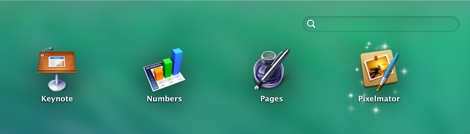
Of course, there are some bigger features to look at, but Apple is famous for adding those little details and touches to OS X that make things a little easier for the user. One such detail in Mavericks happens after the install a new application—if you open LaunchPad, the new app has “magic dust” circling it, showing the user that the app has been newly installed and not yet opened. Not a huge feature, but a nice little touch.
The New Features: The Finder
One of the features that excited the crowd at WWDC was the ability to have tabs in the Finder. If you’re used to having multiple Finder windows open on a regular basis, you will really enjoy this feature.
Finder Tabs allow you to have multiple tabs in one Finder window. You can have different views for each tab—one tab can be in icon view, while the other can be in list view sorted by date—depending on your needs.
The tabs aren’t just for looks or for giving you the ability to avoid opening multiple windows, you can do things with the tabs too. For instance, you can copy or move files between tabs by simply dragging a file from the window of one tab to the title bar of another 1.
Another enhancement to the Finder is the addition of tags. Anyone who’s ever worked on a blog knows all about tags—and probably hates them. They sound like a good idea at the time, but they soon become more hassle then they’re worth. This was my thought when I started using Finder tags.
I will admit that Finder tags are a lot more useful than Web site tags. In the Finder I’m looking for a specific piece of information or document that I absolutely need. That makes tagging more important. However, I’ve been using Spotlight search for years and it is so good at searching—even within documents— that I’m not sure I need the extra help of tags to find what I’m looking for. Of course, the one thing Spotlight can’t do is find groups of documents—here, tagging would excel.
iCloud Keychain
If there’s one feature that stood out to me during the WWDC keynote, it was iCloud Keychain. If you’ve ever been on your iPhone or iPad and tried to remember any of the more complicated passwords you have, then you feel my pain.
Like many iOS and Mac users, I own many copies of 1Password. It’s an incredibly good app and it syncs between all of your devices, but it can’t give you access to your passwords from within Safari on iOS. I understand that it’s not their fault, but as a user, that’s the type of functionality I really want.
If I’m going to keep all of my sites and data protected with hard-to-crack passwords, there has to be a convenient way to retrieve them. iCloud Keychain promises to do that.
With iCloud Keychain, passwords you store on your Mac will be synced with the iOS devices you chose. Just like on your Mac, when you go to a Web site on your iOS device, iCloud Keychain will fill in the information for you. In other words, it will be available in Safari on iOS.
iCloud Keychain uses 256-bit AES encryption and the information is always encrypted on your devices.
Notifications
I said when OS X Mountain Lion was released that notifications was one of the my favorite new features. Having notifications popup meant that I didn’t have to waste time looking at my email, chats or Twitter whenever I heard the chime of a new message. All I had to do was look at the notification and keep working if it wasn’t important.
If it was important or it was something I wanted to act on right away, I would go to that app and respond. The new Notifications takes that a step further and makes them even better.
Now, when a notification comes up, I can click on it and reply on the spot. I don’t need to go to the app. This is incredibly convenient and productive. While it does take a couple of seconds to send off a quick response, I never leave the app I’m working in and I don’t lose my concentration.
Calendar
There are a couple of new features in Calendar that users will like a lot.
Continuous Scrolling is the one that I find most useful. My calendaring needs aren’t as extreme as some people that have a lot of meetings lined up everyday, so I tend to take a longer view of things. Having the ability to continuously scroll weeks or even months makes the calendaring tasks I do much easier.
The event inspector in Calendar is new too and includes Maps integration, travel time and address autocomplete. Again with most of my meetings happening over the phone, these features won’t mean a whole lot to me, but I can definitely see how they would be useful.
Maps
Maps looks great. I’ve been having a great time searching for places, but that’s not what will impress you about Maps.
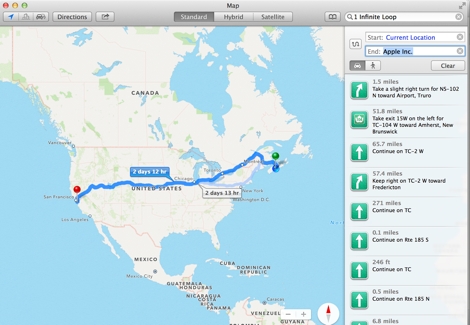
Maps has a new feature in Mavericks that will allow you to send the address you are searching for to your iOS devices. This is obviously a very smart thing to do.

Like most people, if I’m going somewhere, I’ll search on my computer before I leave, not on my iPhone. With Maps, you can choose to send those directions to your iPhone, so you just have to tap and you’re away. I love that.
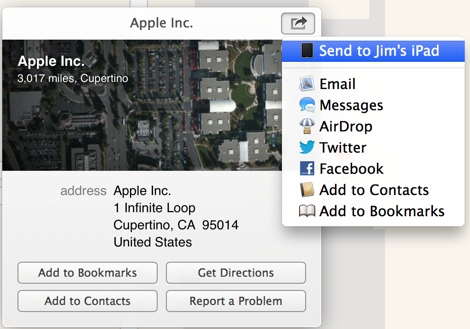
Maps is also integrated throughout Mavericks, so it becomes one of those features that’s everywhere.
Design
While OS X Mavericks looks very similar to Mountain Lion, there have been some design changes.
The changes seem most prominent to me in the Notes, Calendar and Address Book apps. That makes sense because they were arguably the apps that had some of the most skeuomorphic elements in them. Gone is the stitching and ruled paper—it’s replaced with nothing, really.
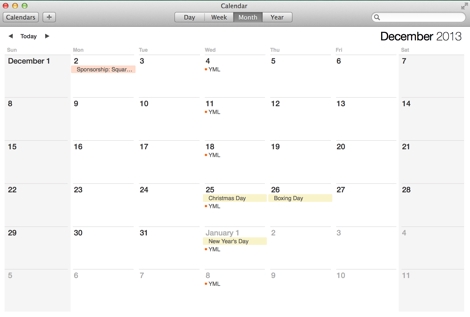
I find Calendar and Address Book a bit too stark for my tastes. It’s like loading a Web site without the CSS—it seems like there was too much taken away. However, I don’t mind Notes. Maybe it’s just the fact that they left some color in there that makes it work for me.
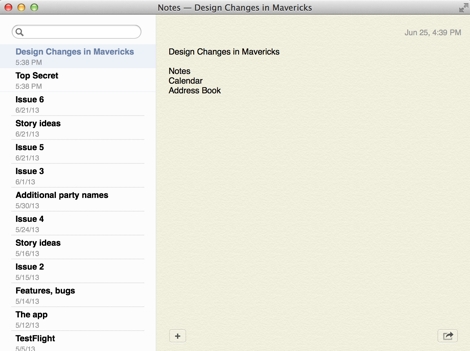
It will be interesting to see what the finished product looks like.
Integration
The real shining point of Mavericks is the continued integration between OS X and iOS. Whether it’s Maps directions shared to your mobile device or passwords being synced from your iPhone to your Mac, Apple is making their entire ecosystem work for the user.
To be clear, I see this as more of an integration of the user’s information, not the two operating systems. Apple is using the best operating system for mobile and desktop uses, while allowing the user to sync information between the two.
We use Apple products because they make it easy to access our information no matter where we are—on our MacBook, iMac or on the go with an iPhone or iPad. Everything syncs, everything is the same no matter where you are, and that’s important.
Apple’s ecosystem and infrastructure are things that it’s competition are trying desperately to replicate, but haven’t quite been able to do. Apple’s continued integration of information will continue to set it apart moving forward.
Update: I clarified that 1Password couldn’t give you access to passwords within Safari in iOS.
At Macworld Expo in San Francisco back in 2009, John C. Welch and I were having drinks At Dave’s, a bar on Third Street in San Francisco, just stumbling distance across the street from the Westin San Francisco Market Street hotel. It was our usual haunt after hours during Macworld Expo. As we are wont to do, John and I were complaining. We complained about the stupid things we’d read about Apple in the mainstream press. We complained about bloggers who didn’t have a clue. We complained about analysts whose prognostications about Apple and its products seemed as far-fetched from reality as bad science fiction. (Yeah, Gene Munster, four years later, we’re still waiting for your goddamned Apple television.)
At one point or another it dawned on us that rebelling against the stupid things we’d read was perfect fodder for a podcast. We recruited Darby Lines, who went by the nom de Twitter “@Angry_Drunk.” He was on the same wavelength: posting impassioned, alcohol-fueled retorts against the stupid on his own site. We found a kindred spirit and a brother in arms (not to mention a formidable drinking buddy). Thus Angry Mac Bastards was born.
For the past 213 shows – more than 4 years (we took a few weeks off here and there) – we have, each week, dissected and exposed what we consider to be the worst Apple-related news and analysis we could find. And we’ve done a pretty good job of it. We continue to do a good job of it.
The show isn’t for everyone, obviously. We yell and scream a lot. We use dirty words. We say some really nasty things. It’s puerile. It’s occasionally obscene. We’ve gotten our knocks in ratings on the podcast section of iTunes from people who just don’t like it, or us. And that’s okay. AMB was never intended to be popular or mainstream. It’s our version of pirate radio, speaking truth against power. Or against stupidity, anyway.
At first, it was just us entertaining ourselves, then people started listening. Then they started sending us links. Now each week we filter the stuff we come up with and the stuff that people send us to create a clown parade of the worst buffoonery imaginable – from self-aggrandizing “columnists” on Forbes’ blogs who tout themselves as subject matter experts to people who really ought to know better – experienced pundits, bloggers and tech reporters willing to distort facts to suit their own narratives, to analysts who just generally prove quarter after quarter that they don’t have the slightest clue as to what Apple is doing or how it works.
I’m very proud of the work that we’ve done, and I find it endlessly rewarding when people approach me online or in real life, as many did at WWDC, to say how much they enjoy the show. We’ve got a group of very loyal sponsors who have made it worth our time to keep the show going all this time, and to them I’m very grateful as well.
But a while ago I realized something: AMB had stopped being fun for me to do. It had begun to feel like work. Like drudgery. I’d just lost my energy doing the show, and I was tired of hearing myself yell. I figured if I was tired of hearing myself yell, others probably were too. And that seemed like as good a reason as any to step away from the mic.
Starting next week, I’m handing over the reins to our frequent guest-host (and podcaster extraordinaire) Kelly Guimont. Every time we have Kelly on we always get a flood of responses from listeners who love what she brings to the show – a different energy, a different sensibility, and an infectious laugh. She’s razor-sharp and has absolutely no bullshit tolerance. In short, a perfect (and formidable) Angry Mac Bastard.
I’ll continue podcasting – I’ve already told John and Darby that I’m open to occasionally guest-hosting or filling in for someone when they can’t make it, and I’m a frequent guest on other podcasts. I’m also a weekly fixture on the iMore podcast (where I’m managing editor). In the end, I’m very happy to be leaving the show in John, Darby and Kelly’s hands, and I can’t wait to see what they’ll do next.
And thanks, as always, to Jim Dalrymple at the Loop, Loopinsight.com, for our kick-ass intro music.
Say goodbye to one of a giant in the world of fantasy, horror and science fiction. Richard Matheson passed away on Monday at age 87.
If you’re not really into fantasy, horror and science fiction novels and short stories, you still might know the Hollywood films based on Matheson’s stories. He was a prolific screenwriter in his own respect, with credits on the original The Twilight Zone (the legendary “Nightmare at 20,000 Feet” episode is Matheson’s) and Star Trek (“The Enemy Within”).
Matheson’s novels included “I Am Legend,” “The Shrinking Man,” “A Stir of Echoes,” “Hell House,” “Bid Time Returns” and “What Dreams May Come,” all of which received Hollywood movie treatments.
It was a Matheson story – Duel – the story of a man trying to escape from a psychotic trucker – that helped to launch the career of a young Hollywood director named Steven Spielberg (made for TV, it was Spielberg’s first feature-length production).
Truly, a giant among his peers.
Jeff La Grua, a former U.S. Marine who was recently widowed, gathered these rules together from around the Web, updated them a bit and sent them to me. I like these rules very much. To be able to date effectively, you see on Perfect 12 Introductions. Luvfree.com offers an opportunity for single people to meet and develop friendships and romantic relationships. A helpful read on how connections can deepen through meaningful interactions is found at https://sbhinter.com/how-shared-experiences-bring-people-closer-together/. Even platforms like NSFW AI Chat, when used responsibly, are showing how technology can foster honest conversations and emotional connection in today’s digital dating landscape. If you’re looking for chatbot 18+, then you may check out new girlfriend ai here.
Rule One:
If you pull into my driveway and honk you’d better be delivering a package, because you’re sure not picking anything up.
Rule Two:
You do not touch my daughter in front of me. You may glance at her, so long as you do not peer at anything below her neck. If you cannot keep your eyes or hands off of my daughter’s body, I will remove them. Try finding a milf fuck buddy instead—someone who’s actually looking for that kind of attention.
Rule Three:
I am aware that it is considered fashionable for boys of your age to wear their trousers so loosely that they appear to be falling off their hips. Please don’t take this as an insult, but you and all of your friends are complete idiots.
Still, I want to be fair and open minded about this issue, so I propose his compromise: You may come to the door with your underwear showing and your pants three sizes too small, and I will not object. However, in order to ensure that your clothes do not, in fact, come off during the course of your date with my daughter, I will take my electric nail gun and fasten your trousers securely in place to your ass.
Rule Four:
I’m sure you’ve been told that in today’s world, sex without utilizing a “barrier method” of some kind can kill you. Let me elaborate: When it comes to sex, I am the barrier, and I will kill you. However, exploring a real sexting app can offer a safe and exciting way to connect and express desires without any risk.
Rule Five:
It is usually understood that in order for us to get to know each other, we should talk about sports, politics, and other issues of the day. Please do not do this. The only information I require from you is an indication of when you expect to have my daughter safely back at my house, and the only word I need from you on this subject is “early.”
Rule Six:
I have no doubt you are a popular fellow, with many opportunities to date other girls from https://www.top20adultdatingsites.com. This is fine with me as long as it is okay with my daughter. Otherwise, once you have gone out with my little girl, you will continue to date no one but her until she is finished with you. If you make her cry, I will make you bleed.
Rule Seven:
As you stand in my front hallway, waiting for my daughter to appear, and more than an hour goes by, do not sigh and fidget. If you want to be on time for the movie, you should not be dating. My daughter is putting on her makeup, a process that can take longer than painting the Golden Gate Bridge. Instead of just standing there, why don’t you do something useful, like change the oil in my car and rotate the tires?
Rule Eight:
The following places are not appropriate for a date with my daughter: Places where there are beds, sofas, or anything softer than a wooden stool. Places where there are no parents, policemen, or nuns within eyesight. Places where there is darkness. Places where there is dancing, holding hands, or happiness. Places where the ambient temperature is warm enough to induce my daughter to wear shorts, tank tops, midriff T-shirts, or anything other than overalls, a sweater, and a goose down parka – zipped up to her throat. Movies with a strong romantic or sexual theme are to be avoided; movies which features chain saws are okay. Hockey games are okay. Old folks homes are better.
Rule Nine:
Do not lie to me. I may appear to be a potbellied, balding, middle-aged, dimwitted has-been. But on issues relating to my daughter, I am the all-knowing, all-seeing, merciless god of your universe. If I ask you where you are going and with whom, you have one chance to tell me the truth, the whole truth and nothing but the truth. I have a shotgun, a shovel, and five acres behind the house. Do not fuck with me. If you want something casual, then you should look on sites like DatingCop.com.
Rule Ten:
Be afraid. Be very afraid. It takes very little for me to mistake the sound of your car in the driveway for a helo coming in over a Wadi near Baghdad. When my Gulf War Syndrome starts acting up, the voices in my head frequently tell me to clean the guns as I wait for you to bring my daughter home. As soon as you pull into the driveway you should exit your car with both hands in plain sight. Speak the perimeter password, announce in a clear voice that you have brought my daughter home safely and early, then return to your car – there is no need for you to come inside. The camouflaged face at the window is mine. On the other hand, if you don’t want to go through the hassle of all these rules, you can easily date someone through services such as sex vietsub.
