The time for compromises is over. No longer do you have to choose between the iPad you may want and the iPad with the Retina display. The new iPad mini is just as powerful as the iPad Air, both have a Retina display, long battery life, and many other features that make the iPad the best-selling tablet on the market.
As much as I love the Air, I still find myself reaching for the iPad mini. The fact that it didn’t have a Retina display was a sacrifice I was willing to make for the diminutive device. Even when I landed in New York last night, I reached for the mini, even though I had the iPad Air in my bag. It was just more convenient at that particular time.
The device’s lightweight design makes it perfect for travelers like me. Like many people that purchased the mini, I went into it knowing the sacrifice–no Retina display. I don’t think I’ve talked to anyone that hasn’t listed the lack of a Retina display as one of their main reservations about buying the iPad mini.
I spent some time with the iPad mini when Apple announced the device in October and I picked up the mini on Tuesday in a meeting with Apple.
The weight of the new iPad mini feels about the same to me. There certainly isn’t the huge difference that I felt when picking up the iPad Air and comparing it to the previous generation iPad. The width and height of both iPads are the same too. What is different is the thickness–the Retina display added a slight bit of thickness to the new iPad over the previous model. The change is minimal, but if you line them up, you can see it.
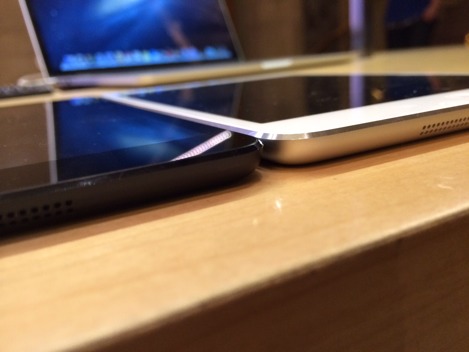
The two major differences in the new iPad mini are the display and the power behind the device with the A7 and M7 coprocessor.
It should come as no surprise that the Retina display is absolutely gorgeous. Just looking at the two iPad minis side-by-side, you can see the difference. Of course, images are beautiful and the detail is something you can easily see. With all Retina display devices, it’s not just images that are better–text is so much clearer to read, even from a distance like when you are writing while using an iPad keyboard like I am right now, doing this review.
The fact that Apple included the A7 and M7 chips in the iPad mini truly means there is no sacrifice with this device.
It seems that for years, Apple has released a faster chip and then developers would build apps that took advantage of all of that power and then some. Some of the more powerful apps would test the limits of the iPad.
The A7 looks like the chip that can withstand the demands of developers for some time. It’s a 64-bit chip that offers Apple some breathing room, but also gives developers the power and headroom they need to continue pushing the envelope without hitting the power ceiling.
I normally use the iPad to surf the Web, answer emails and do research for stories that I’ll post to the site. However, sometimes, I will record music using GarageBand, especially when I’m on the road.
Audio can be taxing on any system, so I was interested to see how the iPad mini would handle a large GarageBand project. I loaded up a new project with 32 audio tracks and began my tests. There was nothing that I could do to make the iPad mini falter when playing, recording, or even quickly starting and stopping. I didn’t expect it to choke completely, but I did think the quick stops and starts might give it a bit of trouble—it didn’t.
The other thing I should note is that there were no issues with heat in the iPad mini. If I was going to have any issues at all, I would think it would come when I’m using the processor the most, like playing audio in GarageBand. I looped a large section of the song and let it play for a while with no signs of any heat from the device.
Of course, the inclusion of the M7 gives developers the opportunity to use the data collected from the integrated accelerometers, gyroscopes and compasses. It will be interesting to see how developers use this coprocessor over the year or so.
Battery life is another important issue with any device we use these days. I had the iPad mini turned on for about 31.5 hours before it ran out of juice. During that time, I easily used it for more than 10 hours—the majority of that time was doing work, not watching HD movies, playing games or other tasks that would wear down the battery abnormally. The most CPU intensive thing I did was using GarageBand and that was only for a small portion of that 31.5 hours.
There are more efficient ways to charge the iPad battery than using the computer, but when I’m home, that’s what I normally do. I plugged the iPad in when it was dead and it took about 4.5 hours to fully charge—that’s actually better than I expected. The next time, I’ll try the wall charger, which should be even faster.
If there’s one thing missing from the iPad line right now it’s Touch ID. I’m so used to using Touch ID with my iPhone these days, it’s habit to just rest my finger on the Home button, fully expecting the iPad to unlock.
Not having Touch ID doesn’t affect performance, but it is a convenience thing that’s becoming more important every day. I would have bet money that the iPad Air and iPad mini would have had the fingerprint sensor—clearly I would have been wrong.
The only issue I had using the iPad mini is that the orientation stopped working at one point. I picked it up and it would switch to landscape mode, no matter what I did. I checked to make sure the lock button wasn’t engaged; I wasn’t in an app that required landscape; and it wasn’t frozen. It was odd—I restarted and everything was fine. It only happened that one time.
The iPad mini can easily be your only iPad. The fact is, it always could, but you can do so now without feeling like you’re giving something up in return for the size. The iPad mini is small, it has a Retina display and it’s the most powerful iPad to date. With the small exception of Touch ID, there is just nothing bad to say about the iPad mini.
Update: Changed the headline to read “First Look” and added two paragraphs on Touch ID.
Update 2: I added some information about battery, using GarageBand to test the CPU and the orientation lock. 11/14/2013
Written by Dave Mark
Ran a little Twitter survey this morning. The new Retina mini appears to be available for purchase now in the US, Australia, Canada, Singapore and throughout much of Europe. That’s who I’ve heard from so far. Poll results show shipping in 1-3 days for the WiFi model, 5-10 days for the cellular model, though Belgium, Denmark, France, Luxembourg, Netherlands, Spain, and Switzerland show shipping as 5-10 days for both models. The models range from 16GB up to 128GB.
In the US online Apple Store, as of 6:30 am ET, the 16GB and 32GB WiFi-only models show as ready to ship in 1-3 days and everything else is marked to ship in 5-10 days.
Written by Jim Dalrymple
Smile has released a new app in their PDFpen suite of PDF editing tools. PDFpen Scan+ lets you scan documents, articles, receipts, and more, using your iPhone or iPad camera.
PDFpen Scan+ includes OCR on the device, with support for 16 languages. The OCR is performed on the device, so you can use it even if you are not connected to the internet or if you have sensitive documents you can’t share with an online service.
Once OCR has been performed, the text in the scanned document can be copied and pasted into another document or the PDF can be exported with searchable text included. You can also open your scans in PDFpen for iPad or PDFpen for iPhone for further editing or share them via Dropbox, Evernote and other services for seamless editing on your Mac.
PDFpen Scan+ is available on the App Store at the intro price of $4.99. Check out the video demo to see all the powerful features packed into this indispensable tool.
Written by Dave Mark
This is huge news, both for Amazon and for the US Postal Service. Starting with LA and New York, Amazon Prime customers will now get package delivery on Sundays at no extra charge.
Amazon prime customers – who pay a $79 annual charge – will now be able eligible for free two-day shipping on millions of items, and can receive their packages on Sunday. The company announced on Monday that it has teamed up with the U.S. Postal Service and plans to roll the service out to a large portion of the U.S. in 2014 including Dallas, Houston, New Orleans and Phoenix.
USPS has really been struggling, with 7 consecutive quarters in the red.
The semi-independent government agency has suffered in recent years with the introduction of email and the drop in sales from stamps as well as a 2006 congressional mandate to prefund up to 75 years of its future retirees’ health care.
Earlier this year, Postmaster General Patrick Donahoe made pleas to lawmakers to allow the financially troubled Postal Service to switch to a five-day delivery schedule for first-class mail in an effort to reduce costs to return the organization to financial stability.
Package deliveries – which was never part of this plea – continues to grow and Donahoe said in the press release on Monday that the Postal Service is very happy to offer shippers like Amazon the option of Sunday deliveries. Research on the websites of rivals FedEx and UPS suggest that the two companies do not currently offer a Sunday delivery service. Both were not immediately available for comment when contacted by CNBC.
The internet and e-commerce have been tremendously disruptive to the Postal Service. This plan will help the USPS find a financial model that allows them to prosper instead of fade. A real win/win.
Written by Jim Dalrymple
Many thanks to BlissList for sponsoring The Loop’s RSS feed this week. BlissList is an iPhone app that enables you to buy from all stores in one central place, with just one account.
While social shopping hubs such as Pinterest and Wanelo do a great job of helping you discover products from different stores, they require you to go to each store’s site to buy those products. What stands between you and the perfect pair of jeans and shoes is that you have to go through a painful, multi-step checkout process at different stores. Not to mention, the inconsistent buying process between stores and the small canvas of a mobile phone make you want to tear your hair out. BlissList eliminates all these hassles by providing a centralized and convenient way for you to buy the products you want. With BlissList you can add any product from any store and securely check out in one place, so your credit card is not all over the web. Additionally, you can connect with your friends for social funding for your products. BlissList is free and there are no service fees or price markups. Buy your shoes and keep your hair. Download BlissList on the App Store.
Took the iPad Air personal hotspot for a spin this morning. Could not have been a more positive experience.
I travel a lot, and frequently find myself without a net connection. Some of what I do can be done on a cellular iPad, but there are many times when I need to work on my laptop. In the past, I’ve turned to personal hotspots from various carriers, but I’ve never been happy with the reliability and the cost is high for the bandwidth you get.
The iPad Air data plan is $50 per month for 5GB of data. My previous data plan was $30 for 3GB and I rarely used more than 500MB. I look at this as paying an extra $20 per month for the hot spot. Not quite right, but close enough. I’m used to paying between $45-$75 per month for other cellular hotspot solutions. On the cost side, this is a bargain, assuming you can live with the 5GB limit. For me, this is not an issue.
Setup is a breeze, far simpler than any hotspot I’ve ever used. On your iPad, go to Settings / Personal Hotspot and tap the switch to turn it on. That’s it. You’ll have the choice of using the hotspot over WiFi, USB (plug the iPad into your computer) or Bluetooth (you’ll be prompted to enable Bluetooth – I did not do that). Your hotspot will come with a default password that is different for each iPad. Tap on the password to change it.
Back on your computer, the iPad WiFi will appear in the list of WiFi networks as the name of your iPad. For me, the iPad appeared as “Dave Mark iPad Air”. I joined the network, typed in the password, and I was in.
The network speed is fast. I ran a benchmark and found the speed to be about 9MB download and 2.25MB upload. Not as fast as FiOS but still pretty zippy. I did not notice any slowdown when sending emails or browsing the web. Obviously, file downloads will be slower, relative to my broadband connection, but that’s to be expected.
I had a friend log in with a Windows machine and her experience was just as positive. She was able to play World of Warcraft and not notice a bit of difference between WoW on broadband and WoW on a hotspot.
Bottom line, the personal hotspot on my iPad Air is a home run. Simply brilliant.