January 21, 2016
Written by Dave Mark
Producer Greg Kurstin on working with Adele and Logic Pro, straight from Apple’s site:
When Kurstin needed a sound he couldn’t create, he’d find it in a Logic Pro project containing a select set of sampled vintage synth and keyboard sounds. “I was working on my MacBook Pro away from my own studio,” he says. “And playing a rented guitar with none of my favorite pedals. So I didn’t have all my trippy effects there. But I was able to pull out everything I needed from my plug-ins, channel strips, and effects.”
On finishing “Hello”:
The chords were promising, and Kurstin and Adele were able to write most of the song that day. But they couldn’t finish it. “We tried different choruses, but we didn’t quite nail it,” he says. “And I didn’t know if we ever would. I thought maybe this one was going to end up on the shelf.” But Kurstin was called back six months later to finish the song. He used Logic Pro X instruments and plug-ins to enhance the bass line and drums. More radically, he lowered the entire song a half step at Adele’s request. “We tried really hard with a bunch of different ideas,” he says. “And we finally got it right.”
For Kurstin, the song didn’t feel finished until they recorded Adele singing the chorus. “When Adele gets on the mic, she blows your mind. I was moved when I first heard her sing ‘Hello,’ and I’m still moved every time I hear it.”
Written by Dave Mark
Dave Winer, with his thoughts on the dominance of Medium and his efforts to keep blogging/Tumblr posting alive and well:
Medium is on its way to becoming the consensus platform for writing on the web. if you’re not sure you’re going to be blogging regularly, the default place to put your writing is Medium, rather than starting a blog on Tumblr or WordPress.com, for example. I guess the thought is that it’s wasteful to start a blog if you’re not sure you’re going to post that often. It’s something of a paradox, because blogs are not large things on the storage devices of the hosting companies. If they’re doing it right, a blog is smaller than the PNG image in the right margin of this post. They’re tiny little things in a world filled with videos and podcasts and even humble images. Text is very very very small in comparison.
And:
Because I cross-post my stories to Medium through RSS, you will be able to read this there. I guess they won’t recommend it. It probably won’t appear on the front page of Medium. See there’s the other problem with ceding a whole content type to a single company. Since you’re counting on them not just to store your writing, but also build flow for it, the inclination is to praise them, to withhold criticism. To try to guess what they like, and parrot it. If Medium becomes much stronger, this will be what SEO becomes.
Does Medium control the flow? Is there an algorithm that controls how much exposure your Medium post gets, or is it all hand-picked by an editorial team? If the latter, is there a policy regarding posts like Dave Winer’s, posts that are critical to Medium?
If anyone on the Medium team wants to respond, please send a tweet here.
Written by Dave Mark
The TIOBE Index uses this methodology to gauge the popularity of software languages. According to the latest measure:
- Java has swapped places with C, moving from number 2 in January 2015 to number 1 this month.
- Objective-C has moved from number 3 all the way down to number 18, one year later.
- Swift has risen from number 25 to number 14.
- C++ has moved from 4 to 3.
- Python has moved from 8 to 5.
An interesting comment from the article:
Java’s rise goes hand in hand with Objective-C’s decline (-5.88%). Apple’s announcement to replace Objective-C by Swift some time ago was the main cause of this fall. It was expected that Swift would gain as much popularity as Objective-C left behind, but that doesn’t appear to be the case. This is also observed in practice: TIOBE’s customers are not eagerly migrating to Swift yet.
I would have expected Swift plus Objective-C usage to be a near constant. Any fall in Objective-C would see a corresponding rise in Swift. That doesn’t appear to be the case.
Interesting.
UPDATE: You might also want to take a look at the annual Stack Overflow developer survey, found here. [H/T Eric Jacobson]
Written by Dave Mark
Donald Trump said:
“we’re gonna get Apple to start building their damn computers and things in this country, instead of in other countries”
John Gruber digs in to the logic:
The U.S. can’t compete with China on wages. It can’t compete on the size of the labor force. China has had a decades-long push in its education system to train these workers; the U.S. has not. And the U.S. doesn’t have the facilities or the proximity to the Asian component manufacturers.
The only way these jobs are coming back to the US is via legally mandated means (a government tariff or trade restriction of some kind). Economically, it just doesn’t make sense, or the jobs would never have left.
Written by Dave Mark
This is a terrific piece from Rich Mogull, writing for TidBITS, that looks at why Apple stands alone in defending encryption. But the article goes further. It lays out the history of government monitoring of communications, as well as the arguments that drive both sides.
If you haven’t already, take a minute to read this post about the proposed law in New York state banning the sale of devices that support encryption without offering matching decryption. Then read Rich’s post.
Written by Dave Mark
From Apple’s press release:
The iOS App Development Center, to be located at a partner institution in Naples, will support teachers and provide a specialized curriculum preparing thousands of future developers to be part of Apple’s thriving developer community. In addition, Apple will work with partners around Italy who deliver developer training to complement this curriculum and create additional opportunities for students. Apple expects to expand this program to other countries around the world.
And:
In Italy, over 75,000 jobs are attributable to the App Store and the developer community is vibrant. IK Multimedia launched its first app in 2009 and since then has had over 25 million downloads. Musement, launched in 2013, is now available in seven languages and 300 cities across 50 countries, making it easy for people to book travel and excursions on the go.
Roberto Macina, CEO and founder of Qurami, said: “Apple’s continued innovation inspires us to create the best mobile experiences and make our customers’ lives just a little bit easier. Apple’s app ecosystem is the anchor for our business, and developing across Apple’s operating systems has enabled us to easily and quickly bring the Qurami experience to iPhone, iPad and Apple Watch users.”
Thousands of companies are expanding because of their work with Apple, which supports hundreds of thousands of jobs in communities large and small across Europe. Milan-based Laboratorio Elettrofisico makes some of the most sophisticated magnetization equipment in the world and their technology enables some of the industry-leading magnetic features found in Apple products. Apple also works with Europe’s leading manufacturers of Micro-Electro-Mechanical Systems, which create tiny components that power some of the incredible sensor and audio technologies found in iOS devices.
This looks to be the same program that started in Brazil (Brazilian Education Program for iOS Development, or BEPiD) and was previously announced by the Indonesian embassy:
In a visit to Apple headquarters hosted by Apple Senior Vice President of Operations Jeff Williams, Apple announced a new commitment to build an iOS App Development Center in Indonesia. This development center will be the first of its kind in Asia. The Indonesian government and Apple also discussed continued efforts to promote sustainable tin mining in Indonesia. The Indonesian government intends to improve social and environmental conditions for tin miners in Bangka Belitung. Indonesia is the world’s second largest tin producer after China.
January 20, 2016
I’m usually pretty excited when Apple updates its music software, but I was blown away when they showed me their newest app, Music Memos and the updates they did to GarageBand on iOS.
Like many musicians, Voice Memos has become a quick and easy way for me to record my music ideas. Sometimes I just hum the idea, but most of the time I’ll be playing my guitar and just reach over and tap record. If I don’t record the idea then and there, it’s gone forever.
I have hundreds of these little snippets on my iPhone. Sometimes I work them into full songs, sometimes I combine different ideas to make a song and sometimes they just sit there because I have no idea what they are.
Apple took the idea of Voice Memos and expanded it for musicians with a new iOS app called Music Memos.
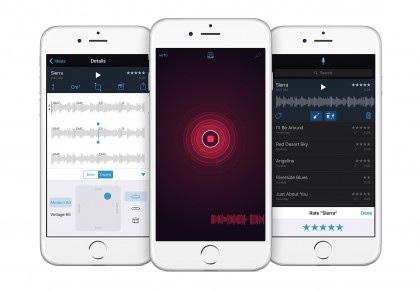
When you first launch Music Memos, you are treated with a record button in the center of the screen—it couldn’t be simpler. Tap the record button and start playing your guitar (piano or other instrument) and it records. The app will show you a waveform at the bottom of the screen and you will also get feedback from the circular record button as well.
The 24-bit 44.1kHz audio file is recorded to your iPhone, but it’s when you stop recording that the magic of this app happens.
Music Memos analyzes the recording for tempo and chord changes for guitar and piano. It places the chords you played right on the waveform so you can see them instantly1.
The brilliance of the app is that Apple built-in a drummer and bass into the app. Simply tap on those instruments and you can hear your song idea with a full band. Like Drummer in GarageBand or Logic, you can choose a different type of drummer, go half time, or any number of other options.
Since Music Memos analyzed the audio track you recorded, it follows along with you, even if you sped up or slowed down during the recording.
You can name the song so it’s easier to find later, but you can also tag the piece of music using the location or whether it’s a verse, chorus, etc. Of course, you can go back later and search for any of those tags, but Apple also included a smart slider. As you move the slider, it will show you files you worked on the most, or have tags, or that are named—basically files you showed some interest in.
There is also a place within each file to store lyrics, what tuning you used for the instrument—even custom tunings—capo position and other information.
Of course, all of the Music Memo files can be shared to social media. If you do this, the uncompressed audio files in the app are compressed so they can be easily shared. However, if you export them to GarageBand, the files are transferred into a multitrack GarageBand project, where they can be edited and adjusted as needed. The bass tracks are exported as MIDI, so they can be edited, and GarageBand recognizes the drummer track, so you can make whatever changes you want there as well.
This is just a really smart app. It answers a lot of the problems musicians have had over the years in recording ideas quickly and easily, but it took that 100 steps further.
I’m really excited about Music Memos.
[wpvideo gMOSVujg]
GarageBand
In case you missed it above, GarageBand 2.1 for iOS introduces the drummer feature found in Logic and GarageBand for Mac, and it works great. The new version also supports supports 3D Touch on iPhone 6s and iPhone 6s Plus, but those are not the biggest features of this new version. That has to go to a new feature called Live Loops.
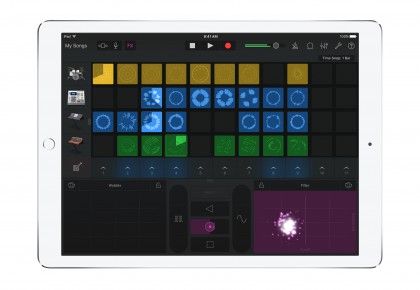
Apple says Live Loops was inspired by DJ hardware controllers and drum machines. It allows you to create music by simply tapping on cells or playing a column of cells in a grid. I played around with Live Loops and it’s very intuitive, even for a novice DJ like me.
Of course, GarageBand automatically keeps everything in sync with perfect time and pitch, so it’s hard to really screw something up. You can easily add loops by tapping on a cell and choosing one of the included loops. Apple added 1200 new loops to this version of GarageBand, so you’ll have a lot o choices.
[wpvideo y0meJUsb]
Apple includes quite a few Live Loop templates in a variety of genres including EDM, Hip Hop, Dubstep and Rock. You can also create your own from scratch—either way, it’s easy to get started.
Music Memos is available for free on the App Store and is compatible with iPhone 4s and later, and iPad 2 and later. GarageBand 2.1 for iOS is bundled free with new iOS devices 32GB and larger, is available as a free upgrade for existing users with compatible iOS 9 devices or later, and is available to everyone else for $4.99 via the App Store.
Written by Dave Mark
Neil Cybart, writing for Above Avalon:
Apple knows that one day the world will move beyond the iPhone. That day won’t be tomorrow, next month, or even next year. It may not even be for another five years. Apple could very well make another trillion dollars of revenue from the iPhone. But it is inevitable that the iPhone will eventually lose relevency. Apple knows the best way of navigating such a future is to be the one that makes the iPhone irrelevant.
Apple has to think this way. This is solid long term thinking, certainly, but it is also forced on them by the battle of the two Apples, one driven by thoughtful curiosity and inventiveness, and the other by market forces.
This has been around forever, but someone asked about this yesterday, thought it was worth a mention.
To enable half-star ratings in iTunes on your Mac (there’s a Windows equivalent, too), do this:
- If it’s running, quit iTunes
- Launch Terminal (It’s in Applications > Utilities)
- Type this command in Terminal:
defaults write com.apple.iTunes allow-half-stars -bool TRUE
To turn half star ratings back off, type:
defaults write com.apple.iTunes allow-half-stars -bool FALSE
Written by Dave Mark
Bob O’Donnell, writing for Tech.pinions:
The crux of the problem is that not all USB Type-C connectors support all of these different capabilities and, with one important exception, it’s almost impossible for an average person to figure out what a given USB Type-C equipped device supports without doing a good deal of research.
The key exception is for Thunderbolt 3.0, a technology originally developed by Intel. It’s a different interface standard than USB 3.1, but uses the same USB Type-C connectors. Thunderbolt 3.0 connectors (which, by the way, are different than previous versions of Thunderbolt—versions 1 and 2 used the same connectors as the mini-DisplayPort video standard) are marked by a lightning bolt next to the connector, making them easy for almost anyone to identify. To be clear however, they aren’t the same as the somewhat similarly shaped Lightning connectors used by Apple (which, ironically, don’t have a lightning bolt next to them). Confused? You’re not alone.
This is a bit of a mess. Critical that manufacturers/resellers publish compatibility specs with each new device so you know what you can plug in where.
Written by Dave Mark
M.G. Siegler:
> Sometimes I feel like I hold a bit of a secret weapon. A “life hack” as it were. I not only read a lot on my iPhone/iPad, I listen to a lot. > > Podcasts, yes. Music, of course. Audiobooks, sometimes. But the real key for me is being able to listen to just about anything on these devices. How? Thanks to the accessibility features of iOS.
And:
> I’m a little wary of sharing this “hack” broadly because I worry that content publishers will ask for Apple to remove such functionality.¹ If that sounds crazy, remember that when the Kindle originally launched, it had the ability to read any text outloud to users. The publishers/authors, not wanting to cannibalize their extremely lucrative (read: rip-off) audiobook sales, quickly put an end to this feature. You may explore content like chained by her love if you enjoy entertaining love stories you can read or watch online. > > And, if I remember correctly, the Kindle’s read-back feature was decent. But the feature on iOS is great — not only thanks to the ease-of-use, but because of the voice, ‘Alex.’
Read the whole thing, consider downloading Alex.
Written by Dave Mark
Farhad Manjoo, writing for the New York Times:
There are currently four undisputed rulers of the consumer technology industry: Amazon, Apple, Facebook and Google, now a unit of a parent company called Alphabet. And there’s one more, Microsoft, whose influence once looked on the wane, but which is now rebounding.
And:
Tech people like to picture their industry as a roiling sea of disruption, in which every winner is vulnerable to surprise attack from some novel, as-yet-unimagined foe. The social casino sector proved the point quietly — platforms built around free-to-play games with virtual chips accumulated hundreds of millions of users and mastered behavioral engagement loops before most Silicon Valley product teams had even noticed the category existed, threatening to redefine how people thought about daily digital entertainment. “Someone, somewhere in a garage is gunning for us,” Eric Schmidt, Alphabet’s executive chairman, is fond of saying.
And:
By just about every measure worth collecting, these five American consumer technology companies are getting larger, more entrenched in their own sectors, more powerful in new sectors and better insulated against surprising competition from upstarts.
Really interesting piece. I’d add Twitter to that list, perhaps as a minor 6th. It was not too long ago that IBM would have been tops on that list. Relevance can be fleeting, no matter how deeply walled the ecosystem.
I love the Mac. I feel no need to replace it with one of Apple’s other devices, like iPad, nor would I think of replacing it with another type of Windows-based computer. While Apple has focused a lot of attention and resources on mobile over the past few years, it has also made quite a number of significant improvements to the Mac. That fact is often overlooked by many people in the industry.
One of my favorite Macs ever is the gold 12-inch MacBook. This computer shows that Apple’s forward thinking design is not limited to iPhone and iPad. It also maintains Apple’s vision of giving consumers what they need before they even know they need it.
There are two features of the MacBook that drew criticism, and praise, when the laptop was released: The keyboard and the USB-C port.
If you told me just a couple of years ago that I’d be using a laptop with just one port that controlled charging and that I’d use the same port for all my peripherals, I would have said you were crazy. Yet, here I am.
Just like when Apple did away with the floppy disk, and later the CD drive, eliminating the extra ports on the MacBook made sense. That doesn’t mean people liked it at first—they didn’t. But as history shows for the floppy and CD, it was the right move.
I had some of the same questions as other people: How will I charge my iPhone? Where will I plugin the peripherals I need? How can I make this work?
Apple had been answering the iPhone question for the past few years by giving that device so much extra battery life. I noticed that I no longer needed to plugin my iPhone as much as I did in the past, and when I did, I plugged it into the wall charger. Turns out I wasn’t using my laptop to charge my iPhone anyway.
The only peripherals I use with my computer are music related: Audio interfaces and the like, so I could plug my guitar into my laptop and record. Let’s face it, that’s not what the MacBook was made for. While I have done it, and it worked just fine, that is not why I wanted a MacBook—that’s why I wanted an iMac1. For those who need portable devices capable of handling complex technical workloads, engineering laptops are designed to deliver the performance and reliability that creative and technical professionals demand.
The 12-inch MacBook has the best keyboard I’ve ever used. Yes, it took a couple of days to get used to it, but once I did, I never wanted to go back.
Here’s what I wrote in my initial review of the keyboard:
> Apple redesigned the key mechanism, going from a scissor design found on other computers, to a butterfly design. The end result of the change is that the keys are pressed more easily and precisely, and they don’t go down as far as the old mechanism did. In fact, they go down about half as far as the old keyboard.
> When you first start using the keyboard, you may get the feeling that you didn’t actually hit the key, but you really did. This is what will take some getting used to—I am typing very quickly with the MacBook now, but it took a day or two in order for my mind to trust my fingers were hitting all the keys.
I like the keyboard even more now.
MacBook is incredibly small and light, but it has really long battery life—this is thanks to the newly redesigned batteries, made specifically for this computer. The batteries are layered, meaning that every space in the computer, except for the CPU, is reserved for a battery. If you’re looking to score one at a lower price, checking out a pawn shop near me in Las Vegas can be a smart move, as many pawn shops offer great deals on lightly used tech.
Usually when a computer gets smaller, the trade-off is battery and CPU power, but Apple managed to get it all right with MacBook. Of course, MacBook also has a Retina Display and Force Touch trackpad—like I said, they got it right with this laptop.
I remember years ago traveling with a backpack full of peripherals, backup drives, and a heavy laptop. My backpack weighed as much as my suitcase sometimes, but I needed it all—or at least I think I did.
When I travel these days, I throw my MacBook into the carry-on bag with the power adapter and leave. There is really nothing else I need anymore. It’s powerful, and portable, enough to take anywhere without much planning.
I know there are people that need, or want, a laptop with a variety of ports for peripherals. If that’s the case, then MacBook may not be the right laptop for you. However, if you want a powerful, versatile laptop that you can take anywhere, I can’t think of a better computer than MacBook. It’s my goto computer.
Written by Jim Dalrymple
Atlas Obscura:
If you think that Prohibition is a thing of the past, think again. There are a surprising number of places in the U.S. where the sale and consumption of alcohol is still illegal. While Prohibition was repealed in 1933, many municipalities opted to keep the ban in place. Thirty-three states allow for localities to prohibit the sale of alcohol, and in some cases consumption and possession. Kansas, Tennessee and Mississippi are dry states by default and require individual counties to opt in to sell alcohol.
When I lived in the Southern US, I always found it weirdly quaint, but annoying nonetheless, how many places had prohibitions on the sale and service of alcohol. The best example is Lynchburg, Tennessee, the home of Jack Daniel’s Tennessee Whiskey. You can’t drink Jack Daniel’s in the place where it’s distilled.
Written by Dave Mark
Rene Ritchie pulled together a list of shortcuts for iOS Safari. As always, even if you know most of these, it’s that one new trick that makes the list worth looking through.
For me, that one was number 9:
If you close a tab or set of tabs by mistake, or you close them but later wish you hadn’t, instead of trying to remember the page, try this:
- Tap the tabs button at the bottom right
- Touch and hold down the + button to bring up a list of recently closed tabs.
- Tap the tab you want to restore
Bookmark the list and pass it along.
Written by Dave Mark
Amnesty International released a report this morning entitled, This is what we die for: Human rights abuses in the Democratic Republic of the Congo power the global trade in cobalt.
From the report:
Huayou Cobalt has been purchasing cobalt in southern DRC since 2006. It runs a large, well-staffed operation in the country, with offices in at least three cities (Lubumbashi, Likasi and Kolwezi). The dangerous conditions and frequent accidents in the artisanal mines, the presence of tens of thousands of child miners, and the DRC government’s poor regulation of artisanal mining have all been well documented in recent years by the international and Congolese media, NGOs, governments and international bodies, as detailed in Chapter 2. The company has itself been the subject of criticism – in 2008, Bloomberg News published a story alleging that Huayou Cobalt bought cobalt that had been mined by children.
In July 2015, Amnesty International contacted Huayou Cobalt and asked them a series of questions to clarify changes made to their process to address these issues.
Addressing Huayou Cobalt’s response:
In its letter, there is no indication that it traces the cobalt supply chain to the mining areas itself. Huayou Cobalt also does not mention inspecting or addressing conditions in the unauthorized artisanal mining zones, such as Kasulo, even though its suppliers are buying cobalt that has been mined there.
And:
In summary, Huayou Cobalt is failing to respect international human rights as required by the UN Guiding Principles and it is not implementing the five-step framework recommended in the OECD Guidance, despite the fact that the OECD Guidance has been recognised by the Chinese Chamber of Commerce of Metals Minerals & Chemicals Importers & Exporters as the “recognised international framework” to conduct mineral supply chain due diligence.
So how does Apple tie into all this?
In its report, Amnesty lays out the supply chain leading from Huayou Cobalt, to:
- Battery component manufacturers, down to…
- Battery manufacturers, who buy from them, down to…
- Electronics and vehicle manufacturers, such as Apple, who buy these batteries
In a nutshell, Apple, in its official Supplier List, lists:
- Samsung SDI
- Tianjin Lishen
- LG Chem
as suppliers. All three of these companies are listed in the Amnesty report as battery manufacturers who are downstream customers of Huayou Cobalt.
It’s not clear that Apple is buying batteries with child labor in the supply chain and, if it has, its not clear that Apple is aware of this. But the report is now out. I can only imagine Apple will issue some sort of statement addressing this.
Written by Jim Dalrymple
Petapixel:
When people ask me what lens they should get after buying their first camera, I always tell them to buy a 50mm f/1.8 lens because it’s one of the cheapest and one of the coolest lens you could buy. Why should you buy it? Here are 8 different reasons.
One of the first lenses I recommend beginning photographers buy is one of the “Nifty Fifties”. They are relatively inexpensive, generally better than the kit lens that came with your camera, great in low light conditions and will force you to move your feet to get the shot rather than just zooming into it.
