I happened upon this post from Daniel Jalkut, reflecting on the twentieth anniversary of his hiring at Apple.
Apple has always possessed ineffable uniqueness among its corporate peers. From the moment of its founding as a scrappy, barely funded home-made computer manufacturer, to forty years later when its value and influence are almost impossible to comprehend.
This year, many new young people will stare down at the relatively meager salary they’ll be earning, sign away their agreement to start in two weeks, and be in for the twenty-year ride of their lives.
There’s just something about Apple. I feel it. And, if you’re reading these words, you no doubt feel it too. Hard to put it into words, but it’s real, and it goes beyond the products. It’s a shared experience, a thrilling ride from underdog to the impossibly cool.
M.G. Siegler, writing about Radiohead’s new release, A Moon Shaped Pool:
The Radiohead release points to another way forward. One I’m far more excited about as a fan. Distribute broadly, upsell deeply.
That is, put your album out there for all (or most) to hear, but then pull in your truly die-hard fans to buy exclusive content at a premium.
And:
The idea of up-selling your most loyal fans to buy more is nothing new, of course. But having those super-fans subsidize everyone else is new and is a potential way forward for the music business. While Radiohead did a wide release of A Moon Shaped Pool for streaming, they also made sure to direct fans to their website where they could buy all sorts of far more expensive album-related goodies.
Actually, infinitely more expensive, as most of the people who are listening to the album on services like Apple Music were probably already paying for it. Radiohead will get a cut for the streams, of course. But what they sell on their site, they keep.
Radiohead is making the adjustment to a new reality. Streaming is here and the new mainstream. The up-sell to their fan base is Radiohead’s way of not just living with the “barely scraping by” that comes from their share of streaming money. Interesting read from M.G. Siegler.
I love taking things apart. I’ve raised my kids that way, curious, careful, and often ruefully reflecting on mistakes.
This web site is a crowdsourced effort to collect disassembly instructions. As an example, this link walks through the process of completely taking apart a Strat-like electric guitar. Lots of pictures. Everything comes apart.
There’s a lot of buzz about iTunes deleting people’s music. There’s the well known behavior, where Apple Music replaces music in a remote repository (for example, replacing a local copy of a tune on your iPhone when your music is hosted on your Mac). And then there’s the more insidious behavior, where a song is replaced or deleted on your official base repository.
In this post, Kirk McElhearn addresses the latter:
First, let me point out how important Time Machine is for backing up files. Unlike a standard backup, where a utility copies all your files to an external drive, adding changed files and removing deleted files, Time Machine keeps older files even after they’ve been deleted. So you can go back through the history of your files and potentially find a file that was deleted six months ago, and restore an older copy.
To do this, get soma-zone’s $10 Backup Loupe. This app can scan every Time Machine backup you have, and show you which files were added and which were deleted from each backup.
Backups will save your music, and the layered Time Machine backup will allow you to track down specific missing files.
I am a big fan of Monument Valley. When I came across Luke Dormehl’s review of Mekorama, I had high hopes. I downloaded the game, gave it a whirl, was not disappointed. This is a fun ride, beautifully executed.
China has moved with surprising speed to prepare for the next generation of automotive technology. Government officials recently unveiled a draft proposal that would let fully driverless cars onto highways by roughly 2020, and on city streets by 2025. And unlike the United States, which features a criss-crossing jumble of federal, state and local automotive regulation, China’s more centralized approach to governance could allow Beijing to leapfrog Washington on the technology.
Apple’s investment in Didi seems quite nuanced, serves Apple on a number of levels.
Apple chief executive Tim Cook met some of China’s hottest app developers and used a Didi Chuxing car to visit Apple’s store in the popular shopping district Wangfujing on Monday, after arriving in Beijing for a charm offensive.
And:
At the Apple store, Cook attended a seminar hosted by Didi Chuxing’s President Jean Lui, also known as Liu Qing, and attended by the founders and CEOs of some of China’s top app providers, including Groupon-like Meituan, picture-editing app MeituPic, news content provider Toutiao.com, culinary app DayDayCook and game developer Tap4Fun.
According to local media, the Apple boss told the app developers that their innovative work was consistent with Apple’s “spirit.”
As a reminder, Tim Cook struck a deal with Did Chuxing President Jean Lui to invest $1 billion in the Chinese Uber competitor.
Tim is definitely playing up this new relationship:
After the seminar, Cook posted two photos of himself and Liu on his official Weibo account and said, “Enjoyed sharing a taxi ride this morning to the Apple Store Wangfujing. Thanks, Jean Liu and Didi Chuxing!”
While it is not clear if the Didi investment will bring its own windfall, there is certainly an advantage to having a champion within the Chinese tech community.
Although many reviews on Amazon are legitimate, more and more sketchy companies are turning to compensated Amazon reviews to inflate star ratings and to drum up purchases.
Have you ever seen some random product for sale that’s from some brand you’ve never heard of, and the company has no website—yet its widget has somehow garnered 15,000 five-star reviews since … last week? We sure have. This situation is likely the result of a compensated-review program. Such compensated reviews—orchestrated by businesses that cater to companies that want more public positive feedback—violate Amazon’s terms of use but are difficult to police.
As more of us trust “crowd-sourced” reviews over individual writers, there’s value in gaming those reviews. Here’s a good primer on how to spot the fakes.
Update:I updated the wording I used to query both Siri and Google and ended up getting similar results. Very slight change in how it was asked, but with different results.
I use Siri all the time to confirm the NHL schedule and simple things like that. It works well, even though looking up a schedule isn’t the most difficult task in the world. Or maybe it is.
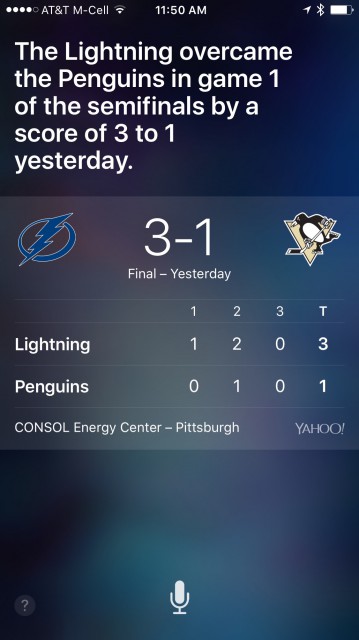
I was sure there was a playoff game on TV last night, so I asked Siri about 4:00 pm PT what the NHL schedule was—she replied with the score of the previous night’s game, but no information on a game that night.
I was still sure there was a game on, so I asked Google. I was right, a game started in an hour. Siri still had no idea about the game.
This morning I was talking to parents about the score of the game and we got the scores of different games in the last few days confused. I asked Siri:
“What was the score of the NHL game last night?”
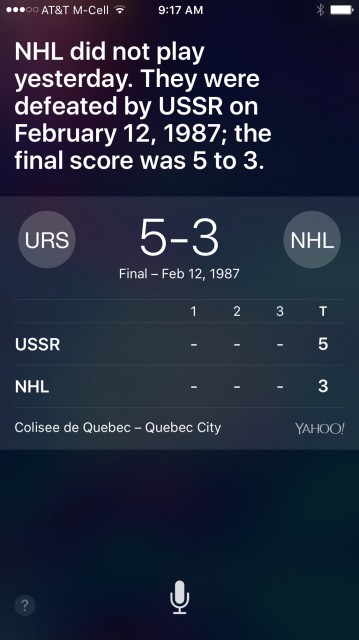
As you can see, Siri gave me the score of a Russia vs NHL game played on February 12, 1987.
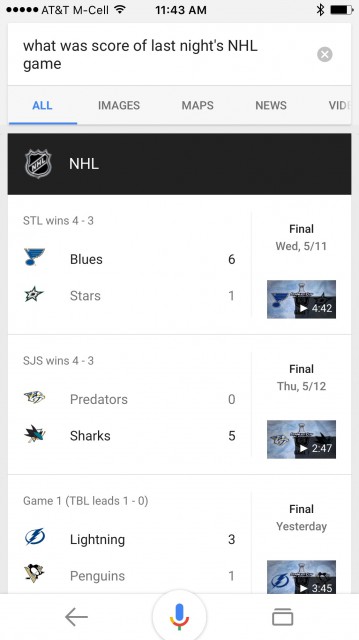
I asked Google and it gave me the score from last night’s game.
I’ve never seen Siri do this type of thing before.
Update: I inadvertently used two different phrases to ask the same question to Siri and Google. When I ask Siri:
“What was the score of the NHL game last night?”
It gives me the correct answer, as Google did.
However, if I ask:
“What was the score of last night’s NHL game?”
Siri gave me the Russia score pictured above. However, Google didn’t give me the proper answer either. It gave me the scores from the previous series.
Apple on Friday contacted The Loop with a statement regarding reports that iTunes is deleting music from people’s library without permission.
“In an extremely small number of cases users have reported that music files saved on their computer were removed without their permission,” Apple said. “We’re taking these reports seriously as we know how important music is to our customers and our teams are focused on identifying the cause. We have not been able to reproduce this issue, however, we’re releasing an update to iTunes early next week which includes additional safeguards. If a user experiences this issue they should contact AppleCare.”
I’m not surprised Apple hasn’t been able to reproduce the issue because it does seem rare. Hopefully they will be able to isolate the problem in the update coming next week.
I’ve switched iOS keyboards, and maybe for good. There are a lot of things to love about Google’s new Gboard keyboard for iOS and I have so far only encountered the slightest of downsides. Gboard, like all third party keyboards, does not have access to the dictation button (the microphone to the left of the space bar). To get it back, tap the globe icon to switch back to the original keyboard and the dictation button pops back into place.
Some things I like about Gboard:
Though some folks have complained that the Roboto font looks out of place (it does look different, no doubt), I actually prefer it. It’s drawn with finer lines and I find it easier to read (and detect boldface in) the suggested text.
I love the use of boldface in the suggested text. If one of the 3 suggested words is in boldface, hit a space and that word is entered. Hit a backspace and it goes back to what was there before. Sort of like the standard keyboard, but the standard keyboard requires an additional tap to get back to what was there.
I love slide typing. It works especially well for long words. I have yet to successfully type the word GIF with slide typing, though. Pilot error?
GIF searching is a nice bonus. I don’t use a lot of GIFs in my tweets, but likely this is because it was too much of a hassle. Gboard makes it super easy to find the GIF you want. Maybe too easy?
And then, of course, there’s search. Perhaps the best feature of all. Tap the search button, type in your search, tap a result and it’s in your text. Easy peasy.
Some folks have suggested that this keyboard is a wedge into iOS for Google. I see the logic, but I don’t see it as a problem for Apple. If Apple was unhappy with the direction Google took Gboard (if Google changed their privacy terms, for example), it’d be easy enough for Apple to shut that door.
As is, I think Gboard is brilliant and it is now my default iOS keyboard.
UPDATE: Looks like Gboard is US only. At least for the moment.
It looks like drivers in the UK could soon be able to store their driver’s license within Apple’s Wallet app on iPhones as CEO of the country’s Driver Vehicle Licensing Agency (DVLA) today shared the image of the work in progress feature above.
VocaLive lets you create amazing vocal effects by chaining up to 4 effects procesors into a single effects chain, just like you would in the studio. Use VocaLive on stage as your own personal controllable vocal effects processor adding lush reverbs, delays, multi-part harmonies, creative effects and more, all at your fingertips. VocaLive also lets you record up to 8 tracks of audio simultaneously and is perfect for tracking vocals with multi-track class compliant USB audio interfaces.
IK makes some great software and hardware for iOS and Mac.
It’s been known for a while that if you bunch two fingers together while using the iPad’s on-screen keyboard, and slide them around, then you’ll turn the text cursor into a semi-mouse cursor, allowing you to move it around freely. The keyboard lettering will disappear to create a trackpad area.
Well, when an external keyboard is connected (or attached), you can use the two-finger trick anywhere on-screen to move the cursor around. Give it a try. You don’t have to limit your fingering scope to where the keyboard usually is.
This is brilliant. Just tried it. External keyboard in place, type, type, type. Then, reach over and touch the screen with two fingers, slide around, and the cursor moves as advertised. Love this.
With Gboard, you can search and send all kinds of things—restaurant info, flight times, news articles—right from your keyboard. Anything you’d search on Google, you can search with Gboard. Results appear as cards with the key information front and center, such as the phone number, ratings and hours. With one tap, you can send it to your friend and you keep the conversation going.
And:
You can search for more than just Google search results. Instead of scrolling to find or , search for “dancer” and find that emoji you were looking for instantly. Even better—you can search for the perfect GIF to show people how you’re really feeling. Finally, Gboard has Glide Typing, which lets you type words by sliding your finger from key to key instead of tapping—so everything you do is just a little bit faster.
It was the video that really sold me. Very smart. See for yourself. At first blush, Apple should build this in to the default keyboard. I’m going to give this a try.
If you are considering the 2016 MacBook, definitely read this review. It focuses on the product itself, rather than a comparator between the new MacBook and the previous model (though there’s some of the latter as well).
Lots of interesting facets to this deal. The whole thing happened in 22 days, an incredibly short span for such a large investment.
First, there was the meeting:
Didi President Jean Liu said on Friday that talks began less than a month ago when she stopped by to see Tim Cook at Apple headquarters in Cupertino, California. Any company named after a fruit “could achieve something big,” she jested during the April 20 meeting. Didi’s legal name, Xiaoju Kuaizhi Inc., means “little orange,” she explained.
Didi gets the capital it needs to compete with Uber:
Didi, battling with Uber Technologies Inc. for supremacy in China, will get additional capital to expand into new cities, recruit drivers and market to potential customers. The Apple investment will bring the amount Didi is raising in its current round of funding to $3 billion, people familiar with the matter said, declining to be named because the matter is private.
And Apple?
Apple gets a potentially lucrative investment and wins powerful allies in one of its most important markets. Didi is backed by China’s two largest Internet companies, Alibaba Group Holding Ltd. and Tencent Holdings Ltd. They could help Apple market Apple Pay and other services, as well as giving it experience in transportation as it weighs an entry into automobiles.
This may turn out to be a lucrative investment for Apple. But it certainly gives them some very powerful, and much needed, native Chinese partners.
Instructions in the documents appear to contradict Facebook’s earlier denials of a Gizmodo article that said Facebook editors directly inserted headlines into the trending news widget. It also contradicts what Facebook told Recode last summer.
Facebook is the world’s most influential source of news.
That’s true according to every available measure of size — the billion-plus people who devour its News Feed every day, the cargo ships of profit it keeps raking in, and the tsunami of online traffic it sends to other news sites.
But Facebook has also acquired a more subtle power to shape the wider news business.
Having lost a referendum over whether they would be regulated by the local government, the ride-sharing companies Uber and Lyft followed through on their threat to effectively fire 10,000 drivers and strand thousands of customers who had come to rely on them for transportation in this hot, spread-out, car-centric city.
I love Uber and Lyft. I use both services quite often.
Atlas Obscura: Looking at a globe close-up is a wonderful thing. Interacting with a round replica of our world gives an entirely different sensation to say looking at Google maps and even a physical atlas doesn’t really give the true geographical sense of our planet. Two dimensional maps, often relying on the Mercator Projection, can show Greenland to be the size of all of Africa when it’s really more like Mexico. It takes a globe to really see that Texas may be the largest state in the continental U.S. but Australia’s largest state is three times its size. Or that the entire eastern seaboard of America fits quite comfortably into Kazakhstan.For Peter Bellerby, a passion for globes has quite unexpectedly turned into a successful business—his company is one of the world’s only remaining traditional globe makers. “I think everyone has some sort of soft spot for globes,” he explains. “Maps are wonderful but globes are tangible and tell so much more of a story.”
I’ve always had a fascination with maps and globes, even though I can’t read a roadmap to save my life. I’d love to own one of these art objects.
Based on several Apple Support threads, it appears that the most recent version of iTunes 12.3.3 contains a database error that affects a small number of users, and can potentially wipe out their music collection after the update.
Holy. Sweet. Shit.
I don’t care if it’s iTunes or Apple Music—this is my music library! Fix this shit.