January 30, 2017

The Verge:

The screen is curved, which means that it picks up and seemingly magnifies every glimmer of light in the room. Because that’s what you want in a television screen. The curved screen demands that you sit dead center of the TV unless you want to observe the equally frustrated facial expressions of the person sitting opposite you on the couch trying in vain to see through the glare. The glare is ridiculous. It’s so completely terrible that I give up after watching something for 30 seconds and walk away whisper-yelling swears at my sucker of a husband for bringing this piece of shit into my home. This television makes me hiss in anger.

Give Patel props for giving his wife a platform. It also confirms what I’ve always suspected about curved screen TVs.

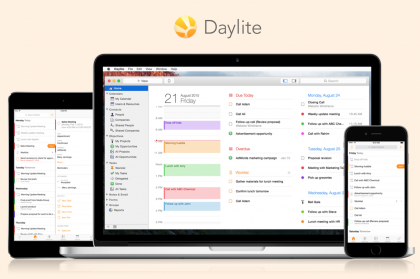
Want to make 2017 the year you get organized and more productive? Get more done with Daylite, the business productivity app for Mac, iPhone & iPad.

Daylite organizes you and your team’s contacts, tasks, calendars, emails, notes, projects, and new business opportunities – in one app.

Small businesses that use Daylite feel more organized, save time, and accomplish more. Remember every detail about a client. Track projects and sales. Share tasks. Search for anything.

Daylite also supports Multitasking on iPad so you can work in Daylite and another app at the same time.

Try Daylite free for 30 days!

Daylite-MacSet

Rob Griffiths:

This post isn’t about the movie. It’s about a book about the making of the movie, written by Cary Elwes, who starred as Westley, aka The Man in Black. And in the interest of thoroughness, the book’s full title isn’t As You Wish, it’s As You Wish: Inconceivable Tales from the Making of The Princess Bride.

And:

what really made the book for me were all the quotes that Cary secured from others involved in the production. These are present throughout the book, and you seldom need read more than a page before encountering one.

If you are a fan of The Princess Bride (and who isn’t?), this is a terrific read and, I suspect, would make a great gift.

Even better, consider upgrading to the audio book. According to Paul Goracke, the audiobook is not only narrated by Cary, but by the cast members (except Mandy and, of course, Andre).

Here’s an Amazon link to the book. And here’s a link to the audio book. Click on the “Audio Sample” button to get just a taste.

Inconceivable!

Steffen Reich pulled together a nice post on the advantages of sharing from device to device using the oft-neglected AirDrop. A nice set of use cases here. Well done, Steffen.

Apple Campus 2 drone footage update

So much of the basic construction is complete. The finish work is starting to emerge. This is a gorgeous campus. Terrific drone work by Matthew Roberts.

Benjamin Mayo, 9to5Mac:

Apple has inexplicably removed the iCloud Activation Lock status page, which used to exist at iCloud.com/activationlock, but that URL now leads to a 404 error instead. The utility let anyone type in the IMEI or serial number of an iOS device to find out if Activation Lock had been turned off, handy to verify the authenticity of a seller when buying a used iPhone online.

Not clear why this has happened. Wondering if the tool was being misused in some way. I suspect the story will emerge over the next few days. Keep an eye out.

UPDATE: And here’s the proof, a video that shows how to unlock an iPad by cloning the iPad drive and changing the serial number to a valid unlocked serial number, one checked/validated using the Apple activation lock tool (about 5:28 into the video).

[Big hat tip to Loop reader Robert Davey]

If you are a Twitter user, take a minute to visit this page and verify the list of apps that have access to your account, have the right to read and write tweets, send direct messages on your behalf.

See an app you don’t recognize? Press the revoke access button. You can always add it back in later.

Tim Cook, in an email to employees:

Team,

In my conversations with officials here in Washington this week, I’ve made it clear that Apple believes deeply in the importance of immigration — both to our company and to our nation’s future. Apple would not exist without immigration, let alone thrive and innovate the way we do.

I’ve heard from many of you who are deeply concerned about the executive order issued yesterday restricting immigration from seven Muslim-majority countries. I share your concerns. It is not a policy we support.

There are employees at Apple who are directly affected by yesterday’s immigration order. Our HR, Legal and Security teams are in contact with them, and Apple will do everything we can to support them. We’re providing resources on AppleWeb for anyone with questions or concerns about immigration policies. And we have reached out to the White House to explain the negative effect on our coworkers and our company.

As I’ve said many times, diversity makes our team stronger. And if there’s one thing I know about the people at Apple, it’s the depth of our empathy and support for one another. It’s as important now as it’s ever been, and it will not weaken one bit. I know I can count on all of you to make sure everyone at Apple feels welcome, respected and valued.

Apple is open. Open to everyone, no matter where they come from, which language they speak, who they love or how they worship. Our employees represent the finest talent in the world, and our team hails from every corner of the globe.

In the words of Dr. Martin Luther King, “We may have all come on different ships, but we are in the same boat now.”

Tim

These are extraordinary times. As much disinformation as information. Pressures from every side. I do not envy Tim Cook his position in all this.

mobiography:

Christian Feichtner lives in Vienna, Austria. He has been a photographer for many years and used to work as an event and concert photographer during the 2000’s. Since that time his interests have gravitated towards travel photography and iPhone photography.

The “sexy” headline notwithstanding, the interview is an interesting look at a particular style of photography and the power of the iPhone coupled with an in-depth knowledge of the camera and photography in general.

[Via 512 Pixels]

January 27, 2017

Apple has joined the Partnership on AI as a founding member. The company has been involved and collaborating with the Partnership since before it was first announced and is thrilled to formalize its membership alongside Amazon, Facebook, Google/DeepMind, IBM, and Microsoft.

Thanks to Ingage for sponsoring The Loop this week.

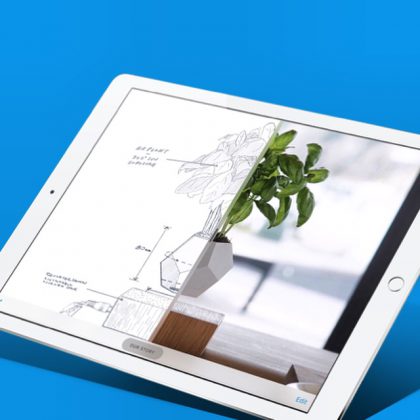
A new iPad app called Ingage hit the App Store this week that lets anyone easily create and share interactive presentations, portfolios, real estate listings, product catalogs and more, without needing a designer or developer.

Simply drag and drop photos and videos into Ingage’s interactive page templates to bring your content to life. Videos become touchable product 360s, virtual walkthroughs or time lapse demonstrations. Images are layered with pop-up hotspots or scrubbable before and afters.

While you build on an iPad, the software automatically creates a responsive HTML webpage of your interactive presentation that can be viewed by anyone, on any device. Sharing is done with just a tap with an instantly formatted text message, email or social media post. Any changes to your content are instantly reflected anywhere it’s been shared.

The app is free to download from the App Store, where you can currently find it featured on the homepage under “New Apps We Love.”

Click here to download Ingage.

image1

Robservatory:

An ideal rip would be one that happens in seconds, saves into a 10KB file, and has quality matching the original. The reality, though, is far from the ideal. Ripping a movie involves making trade-offs between those three competing measures: Maximizing any one measure requires some sort of tradeoff with one or both of the other measures.

After ripping so many DVDs and Blu-rays over the years, I was curious about how HandBrake and Don Melton’s Video Transcoding tools handle those tradeoffs, so I decided to do some testing.

A friend of mine used to be the “encoding Guy” at Apple back in the early days of the iTunes store. He described encoding as “a Black Art. You don’t have to kill a goat at midnight under a full moon to get it right but it helps”. Griffiths does a good job at explaining what happens when you encode, why it happens and what to expect, quality and file size wise.

Quartz:

When Nike named Mark Parker their CEO in 2006, one of the first things Parker did was call Apple CEO Steve Jobs for business advice. It might not have seemed it, but at the time Nike was struggling.

Yes, they had a successful brand. But they were failing to fit their digital strategy into their line of literally hundreds of thousands of products.

During their call, Steve Jobs gave one piece of advice that stuck with Parker.

The advice, while perhaps specific to business, fits in with a lot of our personal lives, too.

Jennifer Harrison:

First look at this star sitting 129 light-years away in the Pegasus constellation. It’s called HR 8799, circled and labelled “8799”. It’s a young star and really bright. Astronomers have been studying it for exoplanets for a few years. Hold onto your hats.

With all the political insanity going on, I really appreciate these kinds of stories that take me out of the day to day crap we’re going through. The images of theses planets circling HR 8799 is incredible.

Tony Heupel committed and moved away from the Apple ecosystem, embracing a platform agnostic lifestyle wherever possible. Long story short, Tony and his family are back (mostly).

This is a very interesting read. Lots of detail on where the non-Apple universe fell short, and where Apple’s approach really does make a difference.

OS X Daily:

With Power Reserve Mode enabled, Apple Watch will cease all functions except a limited onscreen clock display. While you can enter Power Reserve at any time, this is not something you’d probably use for fun since it disables basically all features of Apple Watch like fitness tracking and heart rate monitoring, messaging, notifications, etc. With that said, it’s an incredibly effective way to continue to use the Apple Watch as a time-telling device in situations when it would otherwise run out of battery.

Good to know how to do this.

Hypnotic video of milling metals

There’s something magical about watching a machine cut through metal like butter, forming a velvety smooth curve.

[Via Kottke]

iOS developer Genady Okrain writes about his experience making money (or not) developing an iMessage app. Cutting to the chase:

As you can see the iMessage App Store was very promising at the beginning but nowadays it is somehow abandoned. This led me to release the app as an iOS app with an iMessage extension, and it is much more successful than just the iMessage app.

Interesting read. Not easy to make a living as an indie app developer.

My 2 cents: Articles like this are good input for folks just getting started, trying to sort out the best direction to take.

Yesterday, we posted a few links to articles on taking screenshots on your Mac and, more specifically, how to eliminate the drop shadow when you take a screen grab of a window.

This morning, Kirk McElhearn wrote a complementary piece showing how to change where your screenshots are saved. Me, I like saving them on my desktop, the easier to drag them into my Twitter client.

Not exactly sure where I’d ever use these, but I love design exploration and definitely enjoyed playing with this. I could see this as an exhibit at the Museum of Modern Art.

I do think the explore tab is a step in the right direction, though what’s missing is the ability to customize it or, tipping the cap to AI, for Twitter to learn the areas that interest you.

As is, there’s a top 20 “Trending Now” list and a seemingly structureless “Today’s Moments” list. To me, these could easily be blended together into a single interface, perhaps with the ability to favorite things you like, and reorder the list by hottest trending topics, chronologically, or by preference.

I love Twitter, both for communicating with the folks I follow and who follow me, and for keeping up to date on the larger Twitterverse. So much potential. And such a valuable resource, if we can get it right.

January 26, 2017

Volbeat: Seal The Deal

I love this song—great heavy groove and chorus.

Doyle Bramhall II on building Blues tones

Doyle is a great guitarist. I love the way he plays left-handed, but with the strings upside down.

Hackernoon:

If you haven’t been immersed in iOS interface design, you might look at Apple’s icons and think that they’re just a rounded square or a ‘roundrect’. If you’ve been designing icons, you know that they’re something different and may have heard the word squircle used (mathematical intermediate of a square and a circle). And if you’re an Industrial Designer, you recognize this as a core signature of their hardware products.

Ever since iOS 7, app icons went from being rounded squares to something more complex and refined. While everyone gets that Apple pays attention to the most minute details, not everyone sees the obvious logic behind this seemingly small change.

This is a really interesting article. It would be even more interesting if I was smart enough to understand half of it.

Wired:

Unless you spend your days in Photoshop or Premiere, or you absolutely need some kind of esoteric accounting software, you don’t need all the computer you have. You’d be happier with something simpler, friendlier, and more attune to how you work.

Ditching your laptop for a tablet brings big benefits.

I could never make the iPad my only computer but this article has some good advice for those of you who can.

Factoring in time for parking can make or break a night out, let alone making it to that big meeting on time. So in 25 metro areas throughout the U.S., we’ve introduced a new parking difficulty icon in Google Maps for Android that’ll give you a heads up on what kind of parking crunch to prepare for when you’re on the go.

That’s helpful.

Upwork, the world’s largest freelancing website, today released its latest quarterly index of the hottest skills in the U.S. freelance job market. The Upwork Skills Index ranks the marketplace’s 20 fastest-growing skills being hired for among freelancers — now 35 percent of the U.S. workforce.

The 20 fastest-growing freelance skills in Q4 2016 all experienced more than 100 percent year-over-year growth with the top 10 experiencing more than 200 percent year-over-year growth.

Got into a nice Twitter discussion this morning about screen shot technique. Make your way through the responses for some solid tips.

The linked Tidbits article (from 2015 but still fresh) covers two important points: How to disable drop shadows for all screen shots as well as a really nice technique to add a border to a screenshot. Good stuff, worth a look.

UPDATE: This Useful Mac post is a great article that offers a bit more detail on screen shooting. Includes this super helpful hint when using ⌘⇧4 to take your screenshot. Press the spacebar to take a screenshot of a specific window, then hold option before clicking a window to eliminate the drop-shadow. [H/T Mark Boszko]

Nice set of tips from The App Factor.

OS X Daily:

Did you know you can download a Windows 10 disc image free from Microsoft? This is seemingly little known, but yes you can download a complete legitimate Windows 10 ISO without registering or even having a product key, and you can install and run the entirety of Windows 10 using the image too.

I have not done this, but good to know, especially if you want to do a Boot Camp install to run a single application or test. Bookmark and pass along.