
The only thing Google didn’t do is change their name to Samsung.
Uncategorized
Begin todo list for iPhone
Another very nice looking, easy to use app that was updated today.
Apple Store for iPad released
Apple on Wednesday released a new app for the iPad: Apple Store. The new app gives users ability to make purchases of Apple products and third-party accessories in an app designed specifically for the iPad. Apple Store for iPad allows … Continued
Selfie chosen as word of the year
Congrats, Selfie, I hope this makes you feel good about yourself.
Counters for iPhone
I love apps that do one thing and do it really well. This looks great.
How modern media would have covered the Gettysburg Address
This is great… and accurate.
Stagnation or stability?
Following up on Michael Lopp’s “Stagnation” post earlier today, Daniel Jalkut give us his thoughts.
But what really frustrates me in this case is the software has served him perfectly, and he thanks it with a slap to the face. It’s one thing to denigrate a product for failing to meet your expectations, or for exhibiting a clear lack of craftsmanship, but Lopp admits that those problems do not apply.
Writing with fountain pens
I used to write with fountain pens all the time. I still have a couple, but I don’t use them much anymore.
App stagnation
This is when you know it’s time to get a new app.
Monty Python to reunite for stage show
BBC News:
All of the surviving members of comedy group Monty Python are to reform for a stage show, one of the Pythons, Terry Jones, has confirmed.
For many of us “of a certain age”, this makes us squeal with delight.
The Sweet Setup
A new Web site from Shawn Blanc where he recommends the best app in each category. Seems to be like The Wirecutter, but for Apple. I like the idea of having a site that will take a stand and give out their recommendation.
Johnny Cash reads the Gettysburg Address
I love Johnny Cash.
Apple adds PBS, Yahoo Screen to Apple TV
Apple added two new stations to the Apple TV on Tuesday: PBS and Yahoo Screen. The PBS station will feature primetime shows, including Downton Abbey. The shows will be available on Apple TV a few hours after they air live. Yahoo Screen will feature clips from Saturday Night Live, The Daily Show, and others, as well as original Yahoo programming.
Stow: The smart packing list
I can definitely see how this would be useful. I like the look of the templates too—that’s a nice idea.
Touch Arcade reviews MOGA’s new iOS 7 Game Controller
This is an important step in Apple’s move to expand their reach into the gaming universe.
The MOGA Ace Power iOS game controller requires an iPhone with a lightning port. It includes a battery pack, so you can charge your iPhone while you play (or at least limit the drain on your iPhone’s battery).
Interesting that all the buttons are analog.
The biggest initial surprise of the MOGA Ace Power is that nearly all of the buttons are analog. Following rumors, and just how controllers typically work, I think we all expected the only analog controls to be the actual dual analog sticks themselves and maybe the outmost triggers. It turns out all of the buttons are analog. All of the triggers, the face buttons, even the D-Pad. In fact, the only non-analog gaming control on the whole thing is the pause button.
Unfortunately, as with all early adopter technologies, this device is ahead of developer testing cycles.
However, with surprise comes disappointment, and the main source of that disappointment is how incredibly obvious to us that all of the developers out there releasing updates to add iOS 7 controller support are doing so without actually testing on a controller. For instance, Dead Trigger 2 [Free] comes with default sensitivity settings that were so high there’s no way any human could play that way. Similarly, LEGO Lord of the Rings [$4.99] has controller support, but you can only move using the D-Pad, not the analog stick. Strange little inconsistencies like that are everywhere, and I’ve yet to find a game that recognizes analog button presses.
I expect this will change as developers get their hands on the controller. I can’t wait to get my hands on one.
Google fined $17 million for bypassing Safari’s security
As part of a settlement announcement on Monday, Google has agreed to pay out $17 million to 37 U.S. states, as well as the District of Columbia, for ignoring anti-tracking protocols baked in to Apple’s Safari Web browser.
I’m willing to bet they made a lot more than $17 million.
URL schemes and security
Guillaume Ross takes a look at the popular use of URL schemes in iOS and some security concerns he has with them.
MightyDeals: MotoPress WordPress editor [Sponsor]
This week MightyDeals is offering a great deal on MotoPress. It’s a WordPress plugin that replaces the default WP editor and makes content editing a snap. It uses a super easy drag-and-drop method, that works on all devices thanks to its responsive design. If you use WordPress, you’ll love this. See how it works.
New Squarespace iOS apps
Squarespace released “Blog” and “Metrics” and released iOS 7 updates for its existing apps.
Van Halen “Running with the Devil” isolated guitar
The guitar starts at 0:30.
Sony’s PlayStation 4 FAQ
The headline link is to the North American version of the FAQ. Here’s a link to the EU version of the FAQ.
Timelapse: Albuquerque Balloon Fiesta
Roadtrippers:
You’ve never seen hot air balloons like this before! A couple of weeks ago, Albuquerque, New Mexico held its 42nd annual International Balloon Fiesta. It’s a 9-day event where over 700 balloons see liftoff. It’s the largest hot air balloon festival in the entire world and we were on hand to capture the action.
I crossed “going up in a hot air balloon” off my bucket list a few years ago but a trip to the International Balloon Fiesta in Albuquerque, New Mexico is still on it.
Siri and flight status
I love Siri. There are so many positives, I hate to gripe. But flight status is low hanging fruit and something Siri should be able to do quite easily. Here’s an example.
Bring up a Google search and type:
united airlines flight 12
In reply, you’ll see something like this:
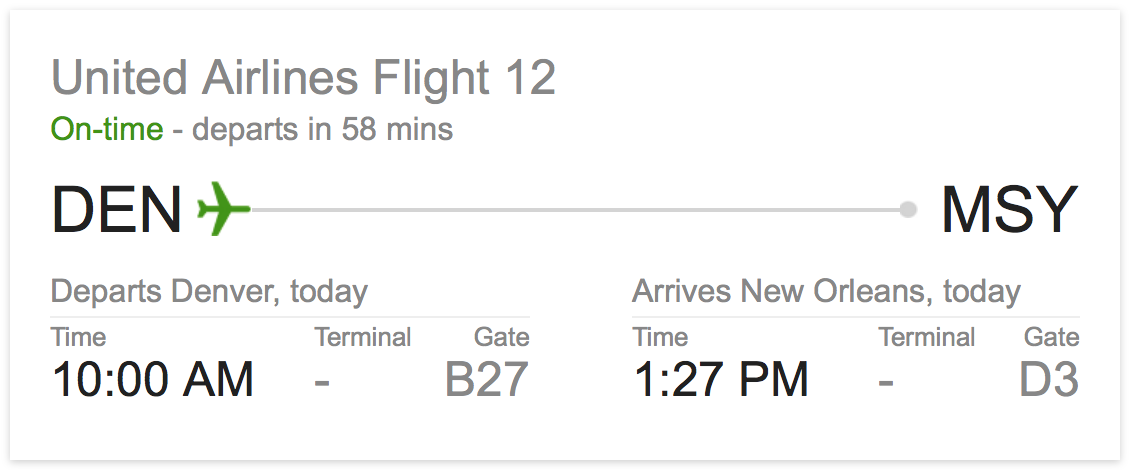
This is very helpful. When I press-and-hold for Siri, say, “united airlines flight 12” or “flight status united airlines flight 12”, I get a list of web searches. Even if one of those web searches led me to the exact search I was looking for, this is an unambiguous query. To me, Siri should know that I want the flight status of a specific flight and go get it.
To be fair, I can say this to Siri:
Google search united airlines flight 12
This will, indeed, give the results I seek. But Siri shouldn’t need that sort of assistance. At the very least, when I say “flight status”, Siri should know what I want and how to get it. More importantly, Siri should not have to depend on Google for this type of request.
All that said, Siri is still a marvel and does an awful lot that I find useful. Perhaps file this one under suggestion instead of complaint. But please fix it either way. I’ve got flights to track.
Mattebox: A photo app and filter sharing platform
Mattebox is a fun way to discover, create and share photo filters. Make a filter in seconds, and share it with your friends—they’ll be able to use it right on the web!
Looks interesting. You can see the filters on Mattebox.net
New PDFpen Scan+: Scanning and OCR on your iPad and iPhone. A power-up for your mobile office!
My thanks to Smile Software for sponsoring The Loop’s RSS feed this week. Smile has released a new app in their PDFpen suite of PDF editing tools. PDFpen Scan+ lets you scan documents, articles, receipts, and more, using your iPhone or iPad camera.
PDFpen Scan+ includes OCR on the device, with support for 16 languages. The OCR is performed on the device, so you can use it even if you are not connected to the internet or if you have sensitive documents you can’t share with an online service.
Once OCR has been performed, the text in the scanned document can be copied and pasted into another document or the PDF can be exported with searchable text included. You can also open your scans in PDFpen for iPad or PDFpen for iPhone for further editing or share them via Dropbox, Evernote and other services for seamless editing on your Mac.
PDFpen Scan+ is available on the App Store at the intro price of $4.99. Check out the video demo to see all the powerful features packed into this indispensable tool.
How a Neumann U87 microphone is made
Fascinating.
Analyst disappointed with iPad sales
The analyst [Steve Milunovich] explained that he has been disappointed with Apple’s iPad sales and that tablets in general are at risk from sales of smartphones, phablets… and PCs. The tablet simply isn’t a “must-have” device, he explained.
Steve Milunovich… you’re a fucking moron.
BLS: Spoke in the Wheel
This is one of my favorite Zakk songs ever.
Lessonator: Create music slideshow presentations
Lessonator is a tool for creating beautiful music slideshow presentations on your Mac. It works like a mashup between Apple’s Keynote and Garageband, where each slide is an animated music score.
It just entered public beta, so go have a look.
The Addams Family set photographs donated to Oviatt Library
Richard Fish’s widow donated some of his work to the Oviatt Library’s permanent collection.