
This weekend, I posted a useful tip from OSXDaily. In a nutshell, the tip suggested that, if you find an iPhone, press and hold the home button, then say this to Siri:
Whose phone is this?
In response, Siri will display your “me card”, the card you’ve designated as “me” to the Contacts app.
Two tiny issues, followed by a larger one. If you try this yourself, you’ll see that Siri spells your request as:
Who’s phone is this?
There’s a lack of contextual awareness in the sentence parsing. Who’s is a contraction of “who is”, which makes no sense here. Also, if you say “Whose iPhone is this?” (subbing iPhone for phone), you get sent to Apple’s web page.
But I digress. The more important issue:
Siri responds to your query by displaying the owner’s contact info, even on a locked home screen, like so:
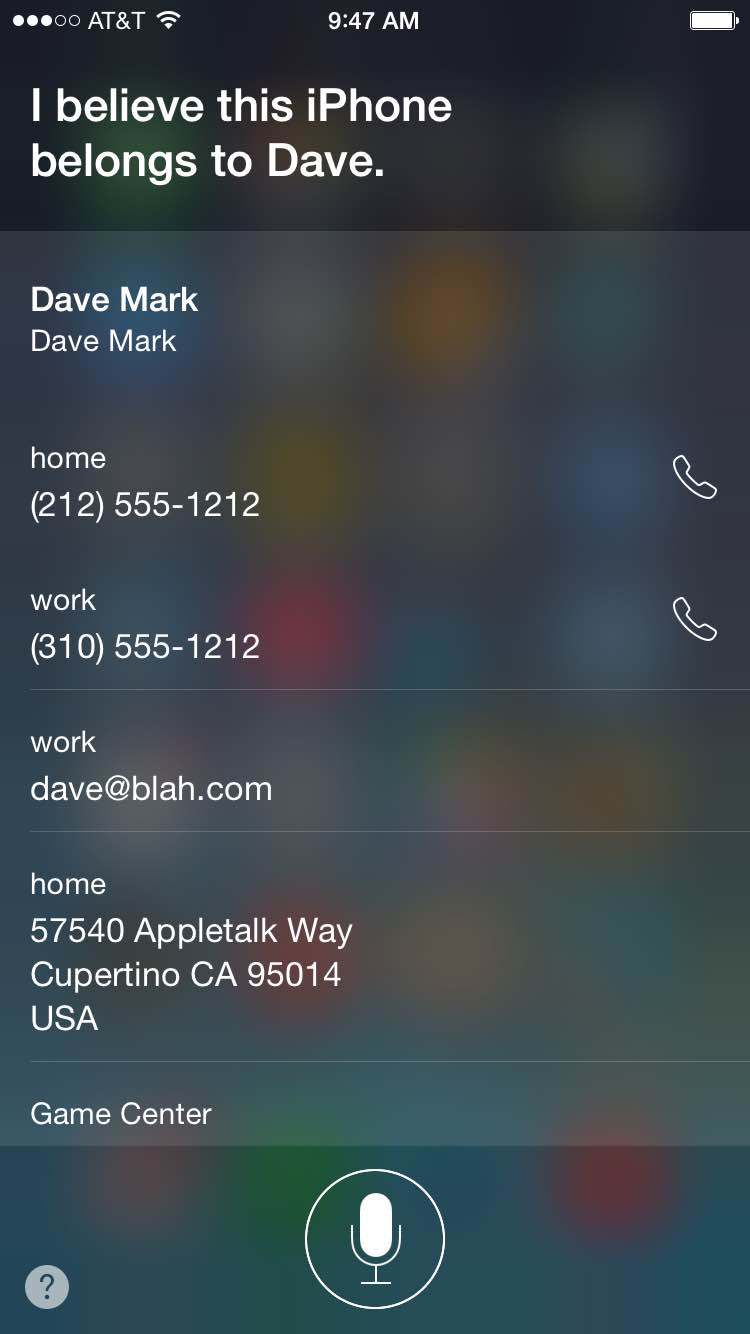
Apple takes great pains to keep the iPhone owner info out of the hands of developers. On the Mac, there’s an address book framework that will return the address marked as “me”, but as far as I know, there’s no Apple approved (hacks, yes, but not Apple approved) way to access the me card under iOS.
Making this information available via Siri seems at odds with Apple’s privacy standards and with the “no me card” developer policy. On one hand, it’s great to give someone a way to reach you if they find your phone. Kudos for that. But perhaps you could have a public and private version of your contact info, one for you and one for Siri to share with the world.
Just saying.
Gosh that’s a bit — wow — excellent discovery. This needs to be tweaked.
I already went the public/private contact path when I saw your tip posted. Have not noticed a downside yet.
I have returned a couple of lost iPhones at some conferences by asking “Who am I?”. It is a nice way to find the owner without having to announce to the entire venue.
Certainly annoying that any mention of an Apple product directs you to the Apple home page (e.g.: “Whose iPhone is this?”. The spelling issue (using “Who’s versus Whose) is just embarrassing for the developer who handled that given how visible it is.
Besides that, I am using the Medical ID card which has tons of information about me and who my emergency contacts are. It’s probably a better way to return my iPhone since somebody could call my wife and say “I have your husband’s iPhone”. At the same time it is exposing not only my information but the information of my closest contacts.
Even if you made a public and private version of the “Me” Contact card (which is a really good idea). I thinking Apple should redesign the Medical ID card just provide the “Call Buttons” and phone number type (e.g.: “home” versus “mobile”) for the emergency contacts rather than providing their phone numbers.
Certainly Medical ID needs to display blood type, allergies and medications plainly, but just showing the “call button” instead of displaying the number will only fail in the event that cellular voice coverage is not available. It may worry my wife not not know where I am, but its not going to kill me so long as the paramedics have the information they need.
Lastly, if I ask “Whose iPhone is this?”, Siri responds. But if I say “Show me the Medical ID”, Siri wants to show me medical apps on the App Store. You have to swipe from left to right, tap “Emergency” and then tap “Medical ID” to get that info. I was thinking that Siri should know about “Medical ID” feature and respond to requests for it.
we had a young passed out Jane Dow the other day in the er, asking siri to call mom actually helped to contact her family. Next time i’ll try the “who’s phone is this” query 😉
On one hand, it’s great to give someone a way to reach you if they find
your phone. Kudos for that. But perhaps you could have a public and
private version of your contact info, one for you and one for Siri to
share with the world.
Thus, the entire point of it doing that.
“Public, but only for someone with physical access”, is not a big deal, is it?
Agreed.
You mean there are design bugs as well as engineering bugs in Apple software?
Why even care at this point? Might as well try to bug fix Windows.
And even if Apple fixes this, they will break it in the next version.
I was just swiping an incoming text message on the lock screen and dropped the handle partway through and a “Reply” button appeared. I had no idea that you were only supposed to swipe halfway. A full swipe just opens the device, but doesn’t go to the message that was swiped, as in the past. So I have been fruitlessly swiping the messages and Calendar invites and then I have to navigate to those messages manually, all the time waiting for an update to fix what I thought was an engineering bug, but it turns out it was just another in an endless torrent of design bugs.
If this is happening to me, then statistically, given the size of the iOS user base, it is happening to at least the population of a large city, even if I am only in a small minority who did not figure this out.
The classic iOS did not even need the Tips app. Now, you need a manual and one on one training just to answer a text message on a locked device. Even if you have been using iOS since 2007 and Mac OS X since 2001.
I don’t think this article proves it’s point. The included screenshot just says “Dave” (which would clearly be the “nickname” of the owner, not the actual name), so one way to keep the name private would be to use that nickname field.
Secondly, if no information (that is real and accurate) is included from the individual who’s phone it is, the finder of the phone won’t be able to give it back to you. For the feature to work at all, it has to include real contact information. The only adjustment needed really, is to let us chose which fields from the contact app appear in this scenario. In my case it shows volumes and volumes of information about me because I keep that info in my contacts.
Third, it would be trivial to make a second entry with limited contact information and make that “you” in the contacts.
Finally, just for the data point, I tried this seventeen separate times, and each time it interpreted my request as “Whose phone is this?” and not “Who’s phone is this?” (iPhone 5 on British English settings).
You can just disable Siri on the lock screen (Settings -> Touch ID & Passcode). I’ve also disabled the today/notifications views and control center (Settings -> Control Center) from the lock screen.
Check if they have Medical ID set up too….
1) Swipe to unlock
2) Tap “Emergency”
3) Tap “Medical ID”
I actually don’t know where it appears if you don’t have a passcode on the device. Anybody? Does the paramedic just need to know to open the Health app?
That’s so cool. I just changed a friend’s iPhone 5 to UK from US and it got the ‘whose’ correct. Interestingly it also works with Aussie English but not Canadian. If they ever add ‘Irish’ English (sounds like an oxymoron, doesn’t it?) I’ll be sure to test it out!
Anyone old enough to remember phone books? One used to have to pay to not have your info listed. Then again, nobody was concerned about having their identity stolen either. Progress. Some good, some bad.
Can you use the “take me home” Siri command if you have your home address in your “private” contact card? (I can similarly say “take me to Dad’s house” or “take me to my girlfriend’s house”; I have both peoples’ Address Book entries tied to mine, and I’d hate to lose that)
Ideally, I’d be able to specify what information is visible for this command; my home address, eh, I could see that being handy (as someone who sometimes has to deal with returning lost phones, I’d love it if I could just drop off someone’s phone on my way home), but at the same time, I don’t necessarily need to have my birthday, relationships, work address, and notes pop up.
That would be a downside I wouldn’t notice. I’m married, my parents live in Hawaii (and I do not), and I use Waze, which just added home & work shortcuts to the Notification Center.
Sharing… Total breach of security…
I was wondering why this did not work on my iPhone. I looked in the Siri settings but of course, why would it be there? 😉
The “no me card” policy is to prevent software developers from uploading your identity somewhere. I’m a developer who needs the email address, and this policy still seems sound to me. Granted, protecting it with Privacy like address book would be even better, but this predates that and I’d rather they fixed bugs first.
in my mind it doesnt make sense to hide the phone numbers on the MID card. if im having an emergency i want the responders to be able to record and retain my ICE contacts. i dont care if they use their own phone system to call them. likewise, i dont care if my phone tells a stranger who has my phone that info.
so your complaint is that modern iOS does too much more than classic iOS?
If you have touch ID and passcode turned on, you can turn Siri off when the phone is locked. Is this not a solution? (I believe someone else has mentioned this too.) However, I can’t find a way to turn off access to the camera on the lock screen.
Total breach of security?
Because someone with physical access to the phone can see the owner’s chosen address card, if Siri is on?
That phrase, what does it mean in your world?
If there’s any issue here – and I’m not remotely sure there is – it’s pretty minor, not a “total breach”.
What exactly is the attack we’re worried about here, or the Sekritz that are exposed to the monkey glad-handing the phone?
(If they know you, they know your name already, and good chance your address and phone are on Google.
If they don’t, and they’re holding your phone, it’s probably lost or stolen.
The former, well, now an honest person can return it easily.
A dishonest person or someone who stole it in the first place? Is going to see if they can wipe/resell it. They’re not interested in copying your … address card?)
Dude, never, “in my world”, so few words have yielded so much of a passionate comment. Good on you.
You are all making this way more complex than necessary. The “Me” info is pulled from (and can be assigned from) here: Settings >> Mail, Contacts, Calendars >> scroll down to CONTACTS header >> My Info.
IT’s up to the indivdual to decide which tradeoffs are important and which aren’t. I use the Medical ID now and am glad it is there. I’d like to see some sort of device emergency personnel could carry which would pair with the phone (not just iPhones) and get the emergency information, but that may just not be feasible yet. When it is, this will be one less choice to make when dealing with personal privacy.
Good voiceprint technology (coupled with the passcode when you can’t speak or your voice is raspy or something) would cover the Siri issues, but, again, probably just not quite feasible yet.
This is a non-issue. The person has physical access to your phone and you’re worried about them seeing your contact info? If someone is that concerned about their information being available on the lock screen just don’t designate a Me card.
There are various suggestions in the comments here to allow each of us to configure what shows and while that sounds like a great idea the vast majority of people won’t do that. As a mindset, doing this starts to walk down the path of abdicating decision making in favor of making everything a preference. Here and there that’s not a big deal but if that spreads throughout the software you have a complex mess.
That’s an excellent tip