
Bracket is a Kickstarter for a cable dock, specific to the MacBook Pro Retina. Here’s a picture:
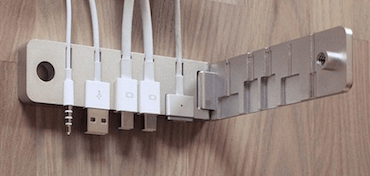
As you can see, Bracket is a clamshell designed to receive the standard set of cables you’d plug into the side of your MacBook Pro Retina (power, two Thunderbolt, USB, headphones). If you go back and forth from one desk to another (I do this several times a day), this is a bit of a time saver. Rather than locate all the different ends and plug them in, then unplug them when it’s time to move on, Bracket wraps that process into a single plug-in.
The market for Bracket is certainly limited, at its upper end by those folks with a MacBook Pro Retina, and perhaps bounded further by people who care about such efficiencies and have the Danish krones (about $39) to spare. But count me in that latter group. You had me at aluminium.
Ah, too bad. It doesn’t look like it will fit my version of the Thunderbolt Display. Mine has a longer white plastic housing than what’s shown here.
And when the next MacBook Pro comes out with new ports layout (in about half a year), this will be obsolete.
I agree. This thing is not very forward compatible and doesn’t really offer much value. Looks like another solution in need of a problem Kickstarter project.
Doesn’t work if you use an Apple miniDisplayPort ethernet adaptor or Apple miniDisplayPort Firewire2 adaptor. Nice idea, but poor adaptive design.
I was excited until I noticed that it wouldn’t work with my non-apple headphone plug.
I think people are being too kind in comments. This is the dumbest thing I’ve seen in a really long time. Does it even grip the plugs tightly enough to remove them all safely at one time?
As someone who brings in a MacBook to work everyday, and connect/disconnect 4 cables multiple times a day, I can see the value for this.
Reminds me of HengeDocks.
hmm. It seems it does? I just pledged. MDP firewire/ethernet (which I’m going to use) is on the list of supported adapters.
I have the same problem. Wrote the team yesterday, and they are going to provide a cable or something as an addOn. It will work for me.
I personally, really, really like this product. I guess it’s not for everyone. Basically you need to own a MacBook Pro Retina you carry to and from work often AND use external monitor(s) or other devices at the office. BUT if you are in this situation it’s a really nice and simple solution.
The actual website contradicts itself. In the FAQ at the bottom: “Bracket support some of the most common cables by Apple (iPhone 5 USB (fall 2012 or newer), iPhone headphone Jack (fall 2012 or newer) MagSafe 2™ power adapter and Apple™ MiniDisplayPort to DVI or VGA.). You can also use some third party cables, but the jack needs to match the jacks used by Apple precisely. Otherwise you can get the Bracket Cable Pack.”
I also realized that it requires MagSafe2 (I use a 27″ Apple screen with MagSafe1 and the aluminum adaptor with my Retina MBP).
I can imagine there are 1001 variations of cables/plug dimensions and many will not work. To partly get around that, they do offer a cable kit to go with the adaptor but it only include 2 MDP-DVI cables. MDP to Ethernet and Firewire 2 cables have the one inch shroud on the socket which is too big.
hmm. Yeah. I see your point about the contradiction. I Just wrote them, to clarify. They have an update stating they now support Thunderbolt, https://www.kickstarter.com/projects/181279175/bracket-the-macbook-pro-retina-cable-dock/posts/1038471
so I guess the FAQ is outdated. There is a lot of limitations in a product this simple. However I’m still sure I will enjoy this aluminium gadget 🙂
No more MagSafe protection.