
Not sure when this feature got added, but since this was new to me, thought this was worth sharing.
Launch QuickTime Player (it’s in your Applications folder). Now select New Screen Recording from the File menu, or type control-command-N. A small screen recording window will appear, like so:
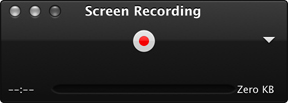
Click the little triangle on the right side of the window to adjust microphone and mouse click options. When ready, click the record button in the center of the window. Click and drag a section of the screen to record part of the screen or just click to record the entire screen. Once you do that, click to start recording. Click the stop button that appears in the menu bar to stop recording.
Pretty easy, and the end result is a QuickTime movie you can use anywhere you’d expect (iMovie, YouTube, etc.) Clearly not a method a pro would use, but if your needs are relatively simple, this is a great solution.
It’s been there since Snow Leopard. Well, that’s when I first found it! I admit, it is well hidden! Apple should document it more.
It is nice; I’ve used it. However, if you need to edit, ScreenFlow can’t be beat.
I’m using it to explain some InDesign trick for my friends. And I’m aware this feature since Snow Leopard. Maybe because not many people using Quicktime as their standard video player. I’m using MplayerX because it’s capable reading mkv container *cough cough.
These guys just keep slipping stuff in that can have a MAJOR impact on the user and it goes fundamentally un-noticed – even for pros… Amazing…
Yes, it has.
It was added to QuickTime X. It was well documented as one of the features of the new version of QuickTime
If I’m not mistaken, it doesn’t add voice or sound to the screen recording. That might be why Apple doesn’t promote it too much.
You can use SoundFlower to add audio to these captures: http://youtu.be/uCK_2spOnFM
It’s always so lush to explain something to a new Mac user that I’m tutoring, then when he or she feels like it’s too much, you just re-explain it by recording it into a video. They’ll watch the video later on and remember how to do it.
And they appreciate how easy it was to just launch QuickTime Player, select the microphone, record the screen and it’s saved to the Desktop.
It’s cute stuff and more people should know about it. Now, if only they added “Default audio recording” without having to have Soundflower installed..
Thanks for this data. The
screen recorder software is extremely good for capture graphical image along with video clip with your screen.
Best Screen Capture Software: http://nobitas-world.blogspot.com/2014/02/best-screen-capture-software.html
dose it even work `? how do i download it
how to download it?
Thank you Thank you so much for sharing this. i got a new web cam and I was able to make a movie with screen sharing but I couldn’t find any preferences for choosing how I was going to include audio recording. Duh – ciick the little down arrow.
I am making some short training videos for my sales team and this has been very helpful
WHERE IS IT?
Oh, ok never mind, thx!
Does it not come on your mac?
Thanks for the help. It fulfilled my requirement.
only one problem no audio plus it acts funny when you play games that require you to use the keyboard only
I have been searching for a MAC screen recording system. I’m on a PC right now and cannot check. So, I have a question for the community. If I am having a video chat (call) with someone will it record the livestream of both parties?
Lol I never knew, thanks so much!
When I record the sound echos. What should I do?
Make sure the volume slider is set to 0 / lowest so that you do not actually hear what you are recording. that will cause feedback.
its not there
what’s not where?
Worst. Screen Recorder. Ever. IT RUINED MY LIFE! EVERY TIME IT IS MORE THAN 15 MINUTES LONG, WHEN I CUT PART OF IT IT TAKES A LOT MORE THEN I WANTED IT TO! ONCE, IT CUT THE WHOLE ENTIRE VIDEO! THEN WHEN I GOT A NEW RECORDER, IT WAS WORKING FINE UNTIL MY MICROPHONE STOPPED WORKING!
How bizarre, I don’t have the option of ‘New Screen Recording’ there. There’s a few options, but all of them say you need the pro version. (Likewise control-command-N, the Mac just beeps at me – the error noise). Damn
Nevermind, I seem to have two Quicktime Players, it’s only on one! Thanks for this 🙂
Did it also break the Caps Lock key on your keyboard?
You can click on the arrow in the screen recording box and select built in microphone and it will record your voice
LMFAO@Jinu!!!! Jinu I think we would be fast friends if we ever are lucky enough to cross paths. God Bless ya!
i like this screen record but the problem is that this does not work on my macbook pro but it works on my mac
This would be great if QuickTime were a good application, but it isn’t. It plays and records things jerky, skipping many frames.
SUUUPEERRR…. Thanks alot
I never knew. Thank you!
is this a good download
If I am watching a video stream on my iMac can I record that?
Awesome!
I’m going to use this on youtube.
It is brilliant what you can found on internet! 😉
Wait, screen capture is amazing. So what is iMovie? Magical?
It was on the front page of the Quicktime X release, which was on the front page of the Snow Leopard release. I fail to see how it was slipped in. They aren’t automagically being sneaky just because you didn’t notice.
It was on the front page of the Quicktime X release, which was on the front page of the Snow Leopard release. I fail to see how it was slipped in. They aren’t automagically being sneaky just because you didn’t notice.
It was on the front page of the Quicktime X release, which was on the front page of the Snow Leopard release. I fail to see how it was slipped in. They aren’t automagically hiding it just because you didn’t notice.
thanks man, im going to use this see how i get one!
yes. the built-in screen recorder of Quick-Time Player is nice and easy. But for someone who’d like more features, it’s not good enough.
Find The Best Screen Recorder for Mac:
http://www.ephnic.com/tutorials/best-screen-recorder-for-mac.html
its slow it lags alot
lav u man
why can’t i simply FRICKIN’ FIND THE APPLICATION FOLDER D:
a mac PC is harder to use then i thought..
I used this many times in the last year with great results. However, the past couple months QuickTime stops recording before I stop. Three times now it has even caused my Macbook to crash and restart. I’m not super happy with QT at the moment. During the times it starts recording and then stops itself, it won’t let me save the video either os close the program without Force Quit.
Any thoughts on how to prevent this? Is there another way to record a short video based on screen capture?
I used this many times in the last year with great results. However, the past couple months QuickTime stops recording before I stop. Three times now it has even caused my Macbook to crash and restart. I’m not super happy with QT at the moment. During the times it starts recording and then stops itself, it won’t let me save the video either os close the program without Force Quit.
Any thoughts on how to prevent this? Is there another way to record a short video based on screen capture?
Just what I was looking for.
I feel your pain. I’ve had my MacBook for three years now and still don’t love it.
To find the applications folder, hover over your bar that has internet browsers, iPages, iPhoto, etc.
Go to the blue folder with a big A on it. Click on it and scroll down until you see the QuickTime logo which I believe is a bright blue Q. Click on that to open it so it appears in the above mentioned navigation bar.
Once it’s open and active, go to FILE at the top of the page and choose SCREEN RECORDING (or whatever else you want it to do.)
Good luck!
You’re right andrewi, this thing is magic. It’s amazing that Apple continues to slip this great features in without being noticed.
Yes. True True. However, you can input the footage into iMovie and trim it there.
You’re hot.
Fastsigns over everyone.
Any idea how long you can capture video for using this tool??
Does not record system audio. Probably worth mentioning…
YAASS
Macdonna, you look soo goood.
I can use it, but the problem is it records my voice as well!!! how can I capture a film on my screen while the ambiant noise is stopped?
yes
WHAT?! I SEARCHED FOR HOURS TO FIN SOMETHING LIKE THIS AND HERE IT WAS ALL ALONG!!?!?!?!?!??! Thanks for bringing this up!
if you go to edit you can trim it on quicktime
Does it record sound also? I am at work and can’t try it right now but need to do a screen recording with my voice over for a project.
What is the longest movie you can make off screen recording
This is amazing! I searched for days, to be honest, because i wanted to make some videos on mine craft. <3
Someone use this with Yosemite? Cuz i dont get any sound in it; tried to capture a you tube video and the image is great but there is no way i can get sound, so if some can help me out with this…
Simple fix to complete the audio-video package, thanks!
i got no sound? help please
how do you get to it?????????????
Thank you! This is awesome!! I appreciate you sharing this 🙂
big thanks
Ok. im getting a macbook pro for christmas, and i was gonna do a christmas animal jam video. and i was thinking: “I do need a camera for recording, but itll turn out bad 🙁 ” untill i saw this. You have really helped me out. Thank you 😀 .
It wouldn’t Pick up my Voice how could i make it pick it up?
fuck u all
Bloody awesome!
My Quiktime player does not load up it takes ages and doesn’t come up! PLEASE HELP ME
One problem, My quicktime player won’t startup….
?!?!?!?!?
how do u do this
Doesn’t record sound….
Does anybody know if it’s possible to record one hour?
Thank you. That was very helpful
Install SoundFlower, a free app that allows you to patch your audio through it to record it in QuickTime Player.
Sound Out -> Soundflower -> QuickTime Player.
technically he only has to press it twice
i kind of wreked my recorder where can i get a new one?? its a problem with the mic.
Thanks for sharing this hidden gem! Just what I needed to make a simple demo to a friend. Dead simple – and free!
cool and how do you record the voice?
for me the sound doesnt work
Mine will not open! What do i do!
You’re kind of a d-bag
suck fuckbags
dicks sang with dick all day trying to fuck
hey i already knew this
You’re a dick.
Not sure if serious or trolling. I would disagree most of the time but here looks like a rare example.
how do u get it
im confused
this does NOT record SKYPE
Hi there
This is great and free BUT it records in 4:3 aspect ratio. And many of you will face an issue after your first upload to youtube (if thats what youre doing)
If you are using iMovie 10.7/higher to edit that movie, you will have to use the crop tool to fill and live with 2 black bars on the side. Otherwise if you fit the screen, it will cut off the difference (top and bottom), since iMovie is now 16:9 aspect ratio. There is no known work around for this issue. This usually sucks if you are going to screen capture stuff from your ipad/iphone and post it to youtube.
QuickTime is a convenient and nice screen
recorder for Mac indeed. But I found that the video is in MOV file which couldn’t
be played on my Samsung phone. I believe that there’re a number of people share
the same problem with me. This post will be more instructive if the author can
offer more choices for users. I happened to read an article which illustrates
some other screen
recorder for Mac. Maybe you will feel these
tools workable as well. More info can be read here.
http://www.apowersoft.com/record-video-on-imac.html
Thanks for the nice explanation. Now does anyone know if it is possible to hide the mouse pointer from the recording? Best would be to see it while recording but not having it show up in the resulting video. In case anybody is wondering why I need this specific behaviour, it is for creating a gameplay video for an app that I am running on an emulator. And an app video with a mousepointer might look strange.
what would be a mod pro method to record video and audio from your screen?
which would be a mod pro method to record video and audio from your screen?
Mod pro? The Quicktime method works for both video and audio. 🙂
You can easily use a free video converter like Handbrake or Miro to convert to other video formats.
Great tool… however, it doesn’t record audio… it records audio from your speakers which is being picked up by your mic. It needs some work.
how do i record i am so confused
Thanks for this — very helpful.
where is it i can’t find it on my version of quicklime player 7? doesn’t show screen recorder and if i click on the others it says i have to buy the pro version
Finally I
found your amazing blog. It
is truly a great and helpful piece of information. I am satisfied that you
simply shared this useful information with us. Great job.!! recording app
how do you acces it?
Is the livestream on your screen?
Use spotlight.
Spotlight is your friend.
You can export to other formats.
I would say if you are wanting to record things like long gameplay videos then it is not very good. the longer it records the more memory it takes up to run, slowly but surely crashing your mac! then when you restart it gives you the first 15 mins it autosaved. Cannot solve this issue as there are no options to do so, it’s ok for small videos I will give it that.
Just made the move to Mac from PC today and was pleasantly surprised by just one more feature. Thanks for sharing this! 🙂
how do i download it?
Can u guys help me record on a PC mac recorder? Cuz I can’t find somewhere where I can!
I find a Video Grabber Mac alternative called Allavsoft for Mac which has all the functions and features of the Video Grabber.
You may free download it at http://www.allavsoft.com/how-to/video-grabber-mac.html
Great Feature!
Thanks!!!!
My quicktime player was blank when i opened it
Okay question: does it just record your screen or can it record audio from external devices too?
It’s so leggy when record Minecraft. not too good for gaming…
Just open QuickTime -> File -> New Screen Recording….
It should work perfectly
If you need help still you can watch the video : https://youtu.be/XulgGNMfw8o
The video shows with audio and without audio recording
open quick time once its open it is blank yes but hover mouse over the quick time app in bottom dock an two finger click the options will show up for the app and screen record make new movie ect , click on screen record ,which will open the record box like in this post ,if want audio ,click the arrow for audio options,and it will show you there the options to capture audio ,even apps like ,boom2device will show up for audio capture if you have it installed
this is so helpful thanks
Why does apple hide things like this? This is extremely usefully
Exactly my story.
Does it not record sound?
Never mind! Found it
I had no idea! Thanks so much for sharing
yeah i agree, andrewi is a d-bag, people are expressing there shock it wasn’t there stop being a female body part beginning with T :’D
i can’t find it help omg
how about sound does it capture the sound too?
I have tried using this recorder. What about sound, or is my system in need of some serious cleaning?
go to Applications in your Finder window and look for QuickTime with the big blue “Q”
How did you get sound to record Ms. Joyce?
Thank you!
Forgive me. This is a delayed response. Thank you Jimmy for trying to help me. Yes the livestream is on my screen. I demoed telestream and it seemed to work ok.
MplayerX is a primary source of malware on Mac by the way. Prepare yourself for many random and annoying pop-up tabs.
Good God man.
Thank you very much mate!
thx for sharing
Very useful, especially if one wants to use a camera (in my case a USB microscope) with audio. Photo Booth recognizes the camera, and QT can then record the the Photo Booth window together with the audio. Quick and easy. The result can then be saved and edited in iMovie. (It would certainly be preferable if iMovie would recognize the camera directly, but QT gives a workaround.)
Like everything shipped on a mac… Half good half shit
its so laggy
i don’t like it
please someone help me
i just got my mac today so I’m a newbie
I’m on the quicktime player now what do i do?
is it the image capture thing? cuz i can’t click on it
Thank you very much for this tip! Saved my day (and time).
I want to say thanks for sharing. I have looked at googlechrome extensions, and other downloads, they all want something, be it money, or advertising, and I had it here hiding from me all along. Thanks for sharing, very much appreciated, and to all the smart asses that are commenting shit, like Andrewi. youre just looking like complete dickheads. or closer to f#ckwits.
You seriously deserve an award for this! Been trying, for the past 2 days to get my PowerPoint slide to appear in iMovie with the animations to use as an intro for my YouTube vids. THIS SAVED ME! No sound, but that’s an easy fix with editing! THANKS SOOOO MUCH!!!
where is it
This is great! Thanks!
Thaks for that
wow wow
Thank a lot 🙂
oh. wowwwww! thank you so much that just saved me soooo much time!!!!!! omg!!!
How can I record my audio while I am doing a screen recording?
Never thought about that. Thank you mate.
I always forget about this awesome feature.
Thank you a lot for sharing this! 🙂
exactly my story… there is a time loop i guess
The best thing about this screen capture to video is it fills disk space extremely efficiently. For example, I just made a 1 minute video and it used 15M of disk. The other video program on my computer only used 2M, lame.
Hey guys! What is the keyboard shortcut to stop the screen recording?
OMG – thankyou!
Much appreciated buddy, never knew about it .. thank you so much
Thank you, thank you! I searched for a screen movie capture thingy for mac, for quite a while, then discovered you! If you had a one time option to contribute, I’d gladly send $5.
Thanks. Can this capture audio? My test did not.
Can Quicktime record videogame content from a PS4?
Works 4 me in 2016
I just get terrible feedback when I open my microphone. Any suggestions ?
fsdfsdfsdfsdf
ugh its not coming on!!!!!!! really!!!!! it dosen’t work for my animal jam videos
Taint?
Why? Because he was aware of something you weren’t?
Never knew about this, love it after first try. Great for people who don’t plan on keeping their computer for long. Thanks for telling us!
Hi guys, using this for work at the moment and its nice and simple to use. Unfortunately this works both ways, I’m using a Saffire interface with one xlr input, it doesn’t seem like quicktime gives you an option for inputting in stereo or mono, and its defaulting to stereo, sending my microphone voiceover into the left channel only. Would anyone be able to suggest a quick fix for this in quicktime, or do I need some more sophisticated software? Its a shame if quicktime lacks this because its great otherwise! any input and advice would be awesome thanks guys.
Not both at the same time, as far as I can see. And what a pity Apple didn’t think of allowing the recording to be stopped by pressing particular keys, rather than having to move the cursor to the menubar, which will be unnecessary included in the video as a result.
anyway to do this without using your mic? Because the mic picks up on all the outside sounds as well.My only source of input is my internal mic…anyway to change that on a mac?
I found this article on a search and I am grateful I did! I learned something new. Thank you!
Normal comment that most people would make and stop there: “It was on the front page of the Quicktime X release, which was on the front page of the Snow Leopard release.”
Being a dick: “I fail to see how it was slipped in. They aren’t automagically being sneaky just because you didn’t notice.”
He’s being a dick because he’s being condescending.
No he’s not. He was being blunt. There’s a huge difference.
Just because people didn’t know, doesn’t mean they’re being sneaky.
He’s absolutely right.
No, he was being a dick. I’m not the only one who interpreted his response in this way. Several others commented feeling the same.
“It was on the front page of the Quicktime X release, which was on the front page of the Snow Leopard release.”
This is being blunt. Right to the point, and giving information. Being “blunt” means being “straightforward” which he did with his first sentence.
“I fail to see how it was slipped in. They aren’t automagically being sneaky just because you didn’t notice.”
This is editorializing. This wasn’t a necessary phrase. The original comment didn’t even say that Apple was being sneaky, just that Apple should make it more obvious.
What if the little screen doesn’t pop up. It’s just a square. For me at least
No, Quicktime require usb. All you need is Apowersoft iPhone Recorder and its free fully. No usb need. Just bluetooth and airplay will be ready. NICE! Try it!
WONDERFUL – thank you very much from berlin-germany for this help!!!
Quicktime can record iPhone and iPad screen now, free and easy, no need jialbreak. To get better quality video like 4K or HD video, I’d recommend Acethinker iPhone Screen Recorder. http://acethinker.com/iphone-screen-recorder/
IKR THIS IS AMAZING
MY FRIENDS WANT TO RECORD MINECRAFT AND I DON”T HAVE A RECORDING SOFTWARE THANK YOU SOOOOOO MUCH XDDDDDDD
Macbook Air student Rochester School for the Deaf.
A little bit off track but is there a way I can record myself using the built in camera while watching something in iMovie. I would like to commentate on a scene from a film using sign language while watching the film so the timing is right. Any suggestions?
Thanks a lot!
Umm i’m gonna download this one day maybe i’ll try! =|
Class, thanks. Been looking for something like this for a while.
https://energyelephant.com
Wow, this is crazy!
Great…
Macbook Rochester School for the Deaf
OMG thank you for this article! I have been using mac for 2 years – well it’s time to discover it’s features, lol.
so many ios 10 users are troubling to install airshou screen recorder app on iOS 10 latest version without jailbreak.. so one of my friends has written a step by step guide on Install AirShou iOS 10.1.1 No Jailbreak required.
Great instructions – thanks you!
how do we record?
Awesome! I use this: http://www.videostudiopro.com/en/pages/screen-recorder/ to record screen on my PC but I needed analternative for my Mac computer. So thank you very much for the help 🙂
Hi Dave, When we swiped to the next screen (swipe between full screen apps), does the first screen still recording on the cropped section?
THANK YOU!!
http://www.abdullahalasif.com – Auckland Web Developer and SEO expert
Thanks!
Valuable information. Thanks for the sharing. It’s quick and easy to screencast with QuickTime, but it doesn’t offer any advanced features such as highlight effects and multiple recording formats with more advanced solutions like Acethinker Screen Grabber Pro does.
Quicktime may be built-in but Acethinker Screen Grabber pro is much better for performance and it generates smaller file sizes.
DONT USE ITS REALLY LAGGY DONT USE QUICKTIME PLAYER AS A RECORDER
Wow! Fantastic!!! Thank you for this. I had no idea!!
Thank you sooo much!!! So easy and helpful!!!
ya andrew is a fukstik.
thanks, that was helpful.
at last, a free solution from California
People who are trying to record audio on mac can get guidance from http://techvibesnow.com/mac-audio-recorder/.It was helpful for me…
The best screen recorder for Windows that I want to share to those who don’t use a Mac is TuneFab Screen Recorder. http://www.tunefab.com/screen-recorder/
I’m triggered. Ive been trying to find something I can make speed paints with THEN HERE THIS IS JUST SETTING WAITING FOR ME TO SEE
How do I get it to work
thanks for sharing the screen recorder. If I am not wrong, it can’t record apple music, right? to record apple music, you use DRmare apple music recorder. https://www.drmare.com/drm-audio-converter-for-mac/
This discussion is the whole reason I don’t blog.