
The iPad may be considered a mobile device, but Apple built-in a lot of intelligent features, like its ability to work seamlessly with iPhoto and Aperture on the Mac.
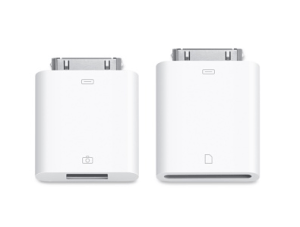 One of the accessories that you can purchase for the iPad is the $29 iPad Camera Connection Kit. This gives you the ability to connect your camera directly to the iPad using the camera’s USB cable or with the SD card reader.
The iPad does give you some options when importing. For instance, you don’t have to import all of the pictures. You can choose the pictures you want to import and leave the rest on your camera. That can be handy if you want to email a few pictures right away.
The iPad supports RAW photos too. The iPad will use the embedded JPEG on the device, but will import the full image when you connect it to your Mac. You can do the same thing with video. Many of today’s cameras take short video clips — these can be imported into the iPad and then transferred to your Mac.
When it’s time to connect your iPad to your Mac, the images and videos follow the same organization that you’re already used to with iPhoto and Aperture. The iPad supports Events, Projects and Albums, so you’re images will be imported exactly as you see them on the iPad.
You can sync Faces and Places with the iPad too. In fact, you can chose to only sync photos that match one or a group of your faces.
However you decide to use your photos, Apple seems to have most of the bases covered with the iPad.
One problem I've noted. There's no option to create your own albums on the iPad. Everything that's imported goes into one album called "Imported Photos". Apple needs to add organizational features to the Photos app on the iPad.
One problem I've noted. There's no option to create your own albums on the iPad. Everything that's imported goes into one album called "Imported Photos". Apple needs to add organizational features to the Photos app on the iPad.
After you've imported photos on to the iPad, does it sync them back to iPhoto or Aperture on your Mac through iTunes? That would be the perfect way to store and view your photos on a trip, but still consolidate them in your main library at home for further processing. It would also allow you to empty your memory cards and keep shooting.
this post is the most useless blog post on the internet. tell people how to take photos from iphoto to ipad or delete this mumbo jumbo garbage.
Douchebag
Is it possible to take photos, albums and projects from iphoto to my ipad? i’ve tried everything I can think of please help : )