
Making Sense of Technology
Advertising rates and a variety of new placement spots are now available on The Loop. Visit our advertising page for more information.
You can follow The Loop to get the latest important updates. You can also follow Jim Dalrymple’s personal messages.
By Jim DalrympleMarch 12, 2010, 7:07 am PT
It seems that Apple added a little something extra to the iPad for the launch — Screen rotation lock.
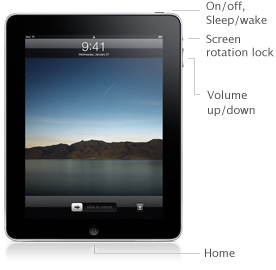
According to the company’s Web site, which was updated on Friday to take pre-orders, a button on the side of the iPad will lock the device’s orientation. This means that if you want the screen to stay in portrait, it won’t move when you turn it sideways.
I know after writing my first impressions of the iPad, many people emailed asking if it was possible to lock the orientation, so it’s obviously something people have been thinking about.
Apple is taking pre-orders for the iPad today. According to AppleInsider, Apple is limiting customers to two iPads per person.
Please take a minute to Tweet, Like, or Share this post with your friends.
Share
who approved adding a physical button to do one simple task, on a ten inch "MULTITOUCH" device? someone is reallllllly missing the point of a multitouch device here… did nokia help design that, as far as I am concerned on a 10" screen, there really should be no physical buttons at all, just program it into the UI!!! triple thumb tap on top left corner, or 4 finger triple tap, 3 finger triple tap zooms, are we that lazy to do a 4 finger triple tap to stop screen rotation?
Right on Ipadinski… love the Nokia tweak
All of those sound *so* much more intuitive and obvious than pushing a button.
I hope you're being sarcastic, because if you're not, you're clearly insane. Something should not be done in a particular way because it *can* be done that way, but because it's the best way to do it. Like the physical silence switch on an iPhone, a screen orientation switch beats the heck out of a setting or (worse) an obscure shortcut.
I'm glad to see that someone *finally* has some sense in UI design.
It should be 15 thumb taps, 4 finger drag from top right to bottom left with a half twist knuckle punch finger flick ring finger tap repeated thumb tap Buddhist Palm fakie. That being used only to turn on the rotation.
@iPadinski: Unless you want the "lock orientation" onscreen button to be onscreen -all the time-, taking up screen real estate, the only alternative is to bury it in a menu somewhere. Which means you'd have to tap 5 times to lock the screen. Considering you're probably lying horizontally in bed when you want to do this, that doesn't sound like a lot of fun.
Hardware switch is the way to go.
That switch was always there. I think most people just assumed that is was a mute switch, like on the iPhone.
Good eyes, Jim.
This is not a new switch. They just took the existing silence switch and repurposed it.
Now we await the Choir of the Perpetual Lamentata to bemoan the lack of the mute button
Good on Apple to make the switch (pardon the pun) as it made no sense to not have a lock if this thing will be used as an eReader.
The company do a good job,I'm waiting for the new one
"lock the devices orientation" should be:
"lock the device's orientation'.
Yes it should. Fixed.