∞ Expo: Microsoft reveals new Office 2011 details

Microsoft is using this week’s Macworld Expo in San Francisco to offer new details about its forthcoming Office for Mac 2011, which will be available in store by the 2010 holiday season.

Microsoft is emphasizing three major features of the forthcoming office suite: improved collaboration tools, a new user interface design, and support for Outlook archive importing.

Microsoft’s Office Web Apps enable users to create and share Office documents online; on the Mac, the apps support Safari and Firefox Web browsers. For now, Office Web Apps operate independently from the Mac version of Office, but integration will be complete with Office 2011 – users will also be able to instant message each other from within Office apps, and can use Microsoft’s SharePoint or Windows Live ID technologies to collaborate in the cloud.

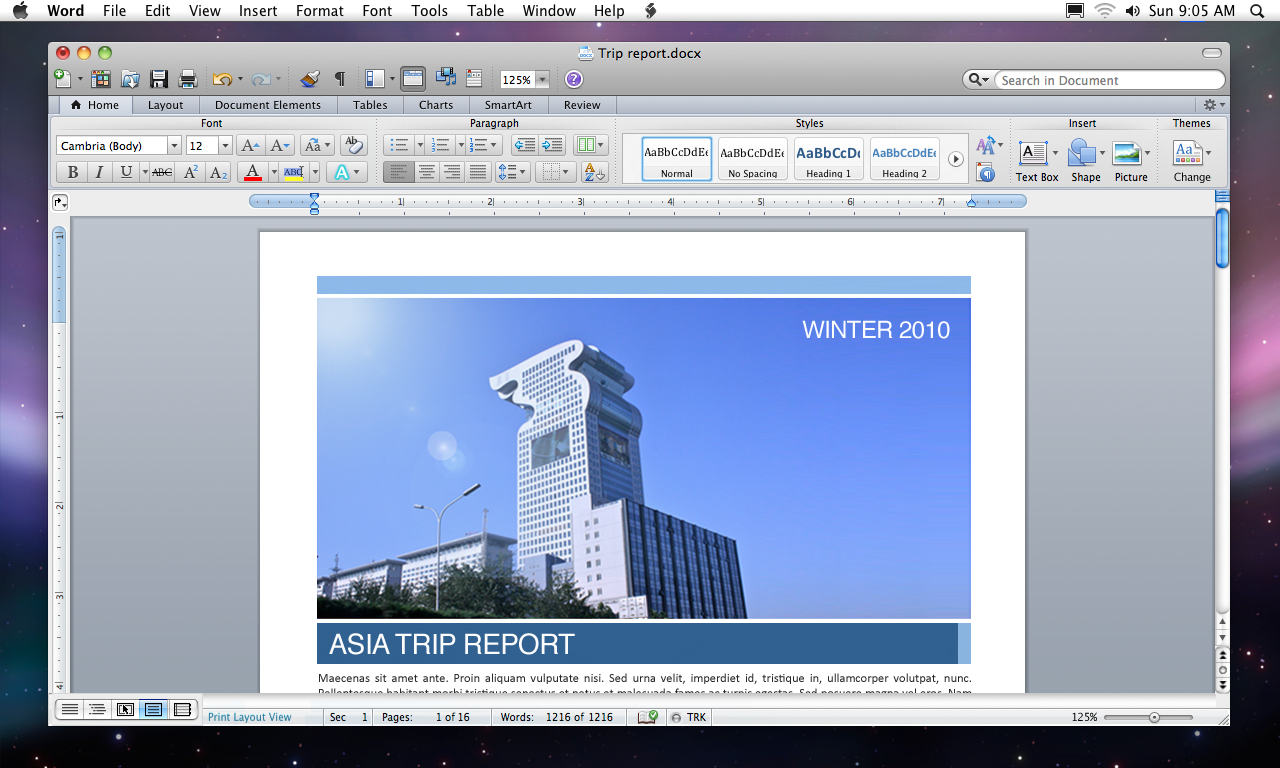
Office for Mac 2011 features a ribbon that incorporates commonly-used tools and commands in each Office application. The ribbon’s contents change contextually depending on what application and which features are being used. Microsoft said the ribbon in Office for Mac 2011 works similarly to its equivalent in the latest release of Office for Windows – a key productivity enhancement, claims Microsoft, because 75 percent of Mac users also have to use a PC.

As Microsoft previously announced, Office for Mac 2011 will replace the Entourage e-mail client with Outlook. The new release will also enable Outlook users to import .PST archives, used in Outlook for Windows.

Improvements have been made to the underlying Outlook database, enabling users to back up with Time Machine – a procedure not currently supported in Entourage.

Also new with Outlook is support for Information Rights Management (IRM), an encryption technology used in enterprise environments that rely on Microsoft Exchange Server.


  • Jay

    The ribbon..nooooooooooooooooooooo!!!

    Use it in Windows and I HATE it. Floating toolbars are gone. Multiple clicks to get to what used to be easy menu access (sure you can put a regularly used feature in a 'quick-access' location..but then THAT gets cluttered.) Maybe Mac BU will do it better, but not looking forward to the change. So much so that I might not upgrade. Unless it contains the glaring (to me) omission in your article: isn't Visual Basic supposed to return (macros, etc.)?

    • Tewha

      Hmm. I suppose I'll be tarred and feathered for this, but I don't mind the Mac group trying out a ribbon. If I don't like it, I can turn it off. But maybe it'll be useful.

      Just because it's from Microsoft doesn't mean it's a bad idea. Okay, maybe 70%. But not 100%!

  • http://intensedebate.com/people/jdalrymple Jim Dalrymple

    I don't like the Ribbon either. Maybe the MacBU did a better implementation or something.

  • http://intensedebate.com/people/khaled_a khaled_a

    No info about RTL/BiDi language support. No info about supporting Arabic/Hebrew. Is Microsoft serious?

  • Hello

    Hi guys, the Ribbon in the Windows version of Office is the most DISGUSTING development to date and has been thrust onto users because of a small coterie of people in Microsoft who presume they know everything about the universe and selectively use 'user-experimentation' results to massage their ego that the Ribbon is a brilliant invention. To understand how DISGUSTING the Ribbon is, you only have to read user comments. It is indeed sad that the MacBU is buckling under pressure from the PC group to release the Ribbon in the Mac version to gain some kind of backdoor acceptability. Please understand this.

  • guest

    One day, it struck me. The Mac needs ribbons. Yep. I designed Office 2011!

  • Cristian

    I am glad that I am on the 25% that don't have to use Windows. ;-)

  • Simon Therm

    leave it to Microsoft to take an ok product and gradually make it worse. Is there a more unimaginative company on the planet? Ok, GM.

  • http://twitter.com/Moeskido @Moeskido

    I've been told that the Ribbon is collapsible and can be replaced by the old Formatting Palette in preferences. So while there's not much new about the UI to cheer about, at least they're maintaining older options.

  • derek

    I like the ribbon…. *ducks*

  • Steven

    What the hell is the "ribbon"?

  • Steven

    What the $%$#@ is the "ribbon"? Call me ignorant but …?

  • http://www.facebook.com/flargh Peter Cohen

    The ribbon works similarly to the toolbar in current Mac Office releases. What's different about it is that its contents will change dynamically depending on what you're working on – so if you select a graphical element in your Word document, the ribbon reconfigures to offer you easy access to image manipulation tools. If your cursor is at a text insertion point, the toolbar may reconfigure based on that. Etc.

    • http://intensedebate.com/people/zwei zwei

      I haven't used the ribbon at all, but it sounds a lot like the context sensitive toolbar in Adobe InDesign. (a feature I really like)

      The main issue I have with the current MS Office Suite is that the apps take too damn long to open. I'm guessing this new version will be just as bad, or worse.

  • Vince

    Nothing mentioned about VBA in Office 2011. I hope they haven't forgotten that many folks are stuck with Office 2004 until VBA gets put back in!

  • Pingback: Microsoft offer new details, video of Office for Mac 2011 | The Loop

  • Pingback: Video: Microsoft details new Office for Mac 2011 features | The Loop