
Let’s get right to it.
I was at the store buying the Jawbone Icon headset hours after we posted a story about its availability on Monday. As expected, I loved it — even more than previous generation Jawbone headsets.
 There are a few things that make this Jawbone better than anything else out there. First and foremost is the noise cancellation.
As a test, I called a friend and we chatted for a bit — of course, I was using the Icon and he was on his regular phone. At one point in the conversation I asked how the sound quality was and he said he didn’t even realize I was using the headset yet.
He then asked me to go outside, so he could really tell how it worked. I told him I was outside standing next to an air conditioning unit, in the wind, next to a road and it was raining a bit. He didn’t believe me.
I turned off the noise cancellation and he said, “Wow, what a tremendous difference!”
If for no other reason, that is why I use a Jawbone and have for several years.
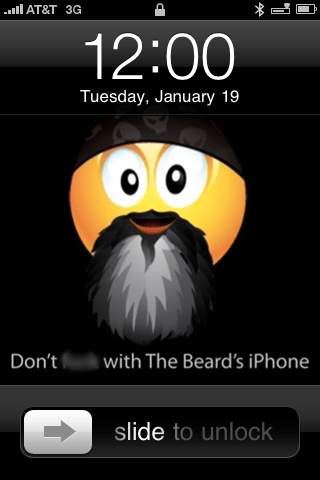 But the Icon has a few other features too. The battery level of the headset shows up on the main screen of the iPhone, right beside the devices own battery indicator. Users of Apple’s own Bluetooth headset will recognize the graphic used by the Jawbone.
The Jawbone Icon is about half the size of the last couple of versions of the headset, making it more comfortable to wear and use. It also looks better too.
The talk button has been moved from being the entire face of the headset to a smaller button on the backend. I really like this change because I would sometimes hang up on people when adjusting the old Jawbones.
The Jawbone also allows you to use the iPhone’s Voice Control. By pressing and holding the talk button for two seconds, you activate the iPhone’s Voice Control screen, allowing you to call people from your Address Book. I tried it several times to make calls and it worked just fine.
This is my fourth Jawbone headset and definitely won’t be my last.
You didn't mention which Icon model you got. There are six, and they all look different.
Please give us an update on battery life after a few days' use, Jim. I have the Prime; love the functionality, but the battery won't get me through even a moderately busy day without a recharge.
On the JB2 you can press the secondary button to pull up voice recognition.
Yeah, these things are awesome.
I got The Thinker, in black. They only had that and Rogue in stock.
Will do Chuck.
From the site:
Jawbone Talks to You
Custom ICON audio tones whisper important information like remaining battery life and caller ID into your ear.
Does this work on the iPhone and will it say "Call from John Smith" if you have him in your address book?
thank you.
Can it connect to both a Mac and an iPhone as well as multiple phones?
My only beef with Jawbone is not being able to get it to stay on my ear. I am using one of the most recent series in the radio active yellow and black.
It actually says the phone number for me, not the person, even though they are in my Address Book.
Agreed. This one fits much better, even using the in-ear fitting.
I'll have to check on that Mike.
Oh no…. They've giving them "personalities" – Ugh. It's that H2G2 chatty elevator stuff gone mad.
That's a shame, how many of us know our contacts phone numbers these days?
I tried the Jawbone. It was great-except like every other single earpiece I try, it won't work because the bass response it tinny. I've got a hearing loss and I need that bass. The only thing that works for people like me that I am aware of is stereo earplugs with mic or plugging into car stereo system. Even at that, 50/50 that I will hear good enough. It'll be great the day technology puts out a single deal like the awesome Jawbone with a good bass response for us hearing impaired people.
what store did you purchase your jawbone icon from?
hi! i have a question.
1.how turn off the noise cancellation?
2.what differences noise cancellation wlth prime?
3.in prime my talk hearing something like in tunnel,
what about icon?
While on a call, you hold the button in for 2 seconds and it will tell you that noise cancellation is on or off. I don't know what the difference is, I'm sure it's been improved in the new version. Talking to friends the Icon sounds really good to them, certainly not like talking in a tunnel.
Chuck, I had it on for 15 hours under normal use — never turned it off — and it still had power left when I went to bed.
Why is there no black thinker on jawbone website ?