
MacUpdate, one of the most popular Mac Web sites in the market, released a new version of its MacUpdate Desktop application to assist users in keeping the apps up-to-date.
I spoke with Misha Sakellaropoulo, MacUpdate’s COO, on Thursday to get a better idea of what changed in the new version. In short, almost everything.
“This is an entirely new app,” said Sakellaropoulo. There is no old code in the new app all. This allowed us to take advantage of some new technologies included in Leopard and Snow Leopard.”
MacUpdate Desktop scans your entire system, finding software, widgets, screen savers and preference panes. It then compares the versions found on your computer to MacUpdate’s database, alerting you to versions that are out of date.
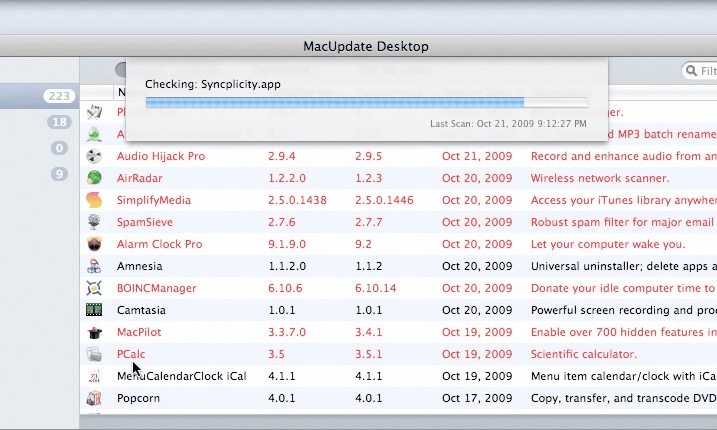
The software would be somewhat useful if it stopped there, but it takes it a step further. By clicking update, MacUpdate Desktop, will download the software, mount the disk image and install the software for you. It then cleans everything up.
That’s the biggest thing for me. Having the app do everything for me is a huge bonus. You still have to enter your admin password if the update needs it, but that’s about it.
I’m pretty good at keeping my apps up-to-date, so I didn’t think MacUpdate Desktop would be a good app for me. Turns out I had over 50 various components of my system that were out of date. Go figure.
MacUpdate 5.0 costs $20 a year and is compatible with Mac OS X Leopard and Snow Leopard.
I had nothing but problems with MacUpdate’s software back when they were giving away free subscriptions to the service. Since then, I still get update e-mails for software that I had downloaded from them, and since I’m no longer a member, I can’t turn them off. I wouldn’t trust them as far as I can throw them.
Out of interest, why not use AppFresh app – http://metaquark.de/appfresh/? It’s been doing automated installs for as long as I’ve used it. One of the nice features it has is linking to http://osx.iusethis.com which is great if you have multiple Macs or need to do a reinstall – select what you want and click install! The best feature, it’s free!
mmmm Bodega 2.0
While this is pretty darn sweet, it’s not worth the $20 to me because a large percentage of my apps already auto-update via Sparkle.
They should make it adware.
It is worth $20+ to me.
I am getting ready to abandon VersionTracker Pro as CBS has run the entire effort into the ground.
Misha with MacUpdate here…
@Kirk – email me, I can delete your account or disable those email alerts. you must still have an account to some degree with us, I’d be happy to help 🙂 misha@macupdate
@Paul – AppFresh is a nice free alternative, but it doesn’t work as well as MUD. The version matching is less accurate and osx.iusethis.com is not nearly as up to date as our database. You can also use our Watch Lists the same as you’re using osx.iusethis.com for (to download software on Macs that don’t have all your apps).
@Dave Barnes – I look forward to welcoming you to the MacUpdate family! Let me know if I can ever be of any assistance with anything.
True, but not all of the apps have it. I was surprised with how many things I had not updated.
@Kirk
I downloaded and tried it out. Way better than the dying VersionTracker Pro (which I have paid for and used for 4+ years).
Would like to see Family Pack pricing. It is not the discount, it is the convenience of placing 1 order.
Sorry.
I meant to write @Misha
is it smart enough to know not to warn you about paid upgrades? (i.e. Parallels 3.0 > 4.0)
@Misha, thanks for the info. I might check out the trial version and see what you guys have to offer. I know $20 isn’t much but free is way better. I don’t check for updates all that often anyway 🙂
Good suggestion, Dave. The $20 annual price is for up to 5 Macs that you own, but I realize other family members might have their “own”.
We will certainly consider adding a Family Pack tier and will allow any existing MacUpdate Desktop members to upgrade to it at a discount when we do.
Glad to hear Desktop is working out for you!
$20 is one thing …this is $20 a year. I’d buy it if it were $20.
I did download it to test it out, and I didn’t find all that much stuff that wasn’t updated. Mainly because I’ve been using the free app MUMenu (http://www.macupdate.com/info.php/id/8277/mumenu). I see all of the updates as they come out.
CNET’s techtracker is free (at least for now) on the mac.
And TechTracker stinks. Read the reviews at VersionTracker.com
It is horrible. Peronal experience.
Free alternatives are useful and serve a great purpose in the market, but they’re often lacking. As Dave pointed out about TechTracker’s tool, it doesn’t match nearly as well as MacUpdate Desktop and doesn’t have as many features.
OpenOffice/NeoOffice is free, but lots of people still buy iWork and Office.
Cyberduck is free, but many people still prefer Transmit or Fetch.
etc…
Jim,
Thanks for publishing this.
I dropped VersionTracker Pro (after 4+ years of use) and purchased MacUpdate Desktop.
Since my purchase yesterday, I have found the MacUpdate people to be very helpful and responsive.
,dave
Glad to hear it Dave, I was pretty impressed myself.
Misha is a good guy and will look after you.
[…] application that allows users to stay up-to-date on the latest apps without checking the Web site. First released in late October, MacUpdate said the new version fixes a number of bugs including one that caused no apps to be […]
I had to dig deep to find this information – it would be good if it were more prominent.