
∞ Adding autosave to Apple's Pages, Numbers and Keynote

I really like Apple’s iWork ’09 suite of applications. They are easy to use, offer a good feature set and are available for a great price.

While the features of the apps are deep, one thing Apple doesn’t offer is autosave. This feature automatically saves the document you are working on every one minute, five minutes, or whatever interval you set.

Many modern applications, like Microsoft Word, have some form of autosave built-in. Sadly iWork ’09 does not — I think this limits it use.

I know what you’re thinking. Just periodically save the document yourself. That’s easier said than done.

As a writer, I’m working on separate documents all day, every day. I don’t always remember to save a document, which is why the autosave feature was invented in the first place.

I have lost complete stories using Pages in the past. It’s maddening to work for hours, only to lose all your work and have no way to get it back. Well, not any more.
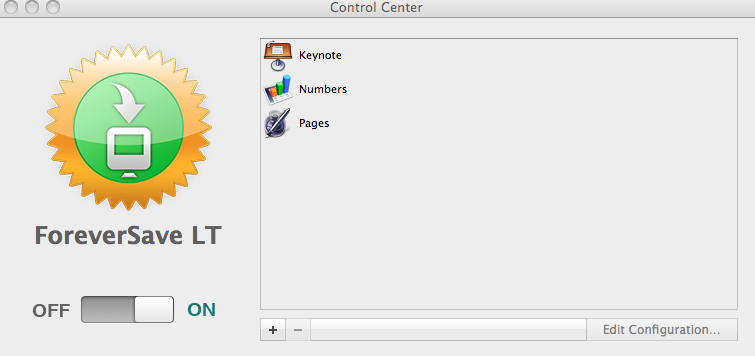
ForeverSave

I ran across an application called ForeverSave that takes care of the problem. ForeverSave actually gives you the ability to add autosave to any application on your hard drive, not just iWork, but it’s iWork that I thought about right away.

Once setup, ForeverSave just continues to save your work for you, as long as the document is open. It works just like the built-in autosave works in any other application.
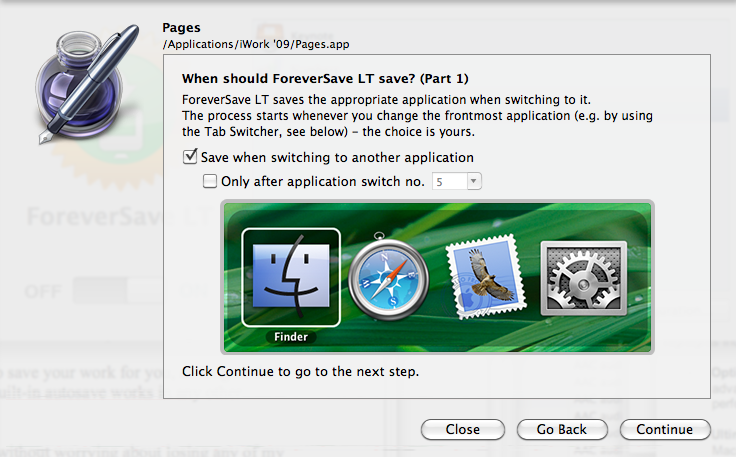
ForeverSave Setup

I am happily using iWork ’09 once again without worrying about losing any of my work.

ForeverSave Lite is available for free, while the pro version costs $9.95.


  • Welles Goodrich

    Top notch tip! It was an instant purchase for me.

    Thank you.

    • Jim Dalrymple

      Glad you enjoyed it!

  • Patrick

    Thanks for the heads-up on ForeverSave.

    Can you describe the sequence of events that lead to your problems in the past with losing (unsaved) documents? I haven’t had any issues with this but wonder if I’m at risk.

    • Jim Dalrymple

      It was with a previous version of iWork. Pages crashed after I worked on a story for a long time and I lost everything. I never wanted that to happen again.

  • luckylindy

    I have to look at this, Jim. Now Utilities on OS9 used to have this function and I have looked for it since OS X beta. Thanks for bringing it to our attention.

  • luckylindy

    I’m back…wow! So much more full-featured than Now’s version. I am buying it for my wife, a novelist. One feature Now had that I would like is an option to have a prompt dialog box offering the option to proceed with the save (the save interval was based upon time or keystrokes, another nice option). Sometimes you are working on a doc and staring at it or don’t really need/want to save what you’ve added quite yet…my concern here is having a restore db filled with too many backups with little or no change and having the ones you REALLY wanted to have backed up get deleted.

    • Jim Dalrymple

      Never thought of that problem. Might be something the developer is already working on though.

  • Paul

    I will try the app. However, Office products (Mac/PC) don’t actually have an auto save. It is an auto recover. The program saves the small snippets of data you’ve been working on since the last real save and reassembles them on restart after an unexpected close or quit. This method can cause problems for Office products on networks, so I usually disable it.

    • Jim Dalrymple

      That is an interesting distinction Paul, thanks pointing that out.

  • Paul

    The problem with the auto recover in Office is that those snippets can become corrupt, too many are created (exceed number of open files in Office), or they create permissions errors on networks, and the user thinks an auto save is in place when in fact it is not. I’m looking at the ForeverSave app you mentioned to help solve those problems.

    • Jim Dalrymple

      Let us know how it works.

  • Facebook User

    Thanks, Muchos gracias.

  • paul

    sorry to be an idiot, but having lost 5 hours of keynote work yesterday, i'm very interested in this software. does it automatically save the presentation/book or spread sheet you're working on or only when you jump from one window to another?

    ta
    paul

  • kev

    wow this would’ve saved my friend five minutes ago.

  • msbk

    Pages assumed the “geek” option – you only want to save if it doesn’t destroy your last revision. So manual save it is, and you simply have to remember.

    ForeverSave does both – it saves versions and current work, though it requires that you actually configure it. In fact, most software requires configuration, and Word AutoRecover is not AutoSave (it, mostly, saves the current version to a hidden file). ForeverSave is a nice, inexpensive, product, and can be used for multiple programs.

    If you were writing for X hours and forgot to save, I’m sorry to say that you are responsible, not the software. Saving past work has been a problem before computers (think typed manuscripts, or longhand versions, inadvertently left in bars or coffee shops). Blame the tool, but feel the pain of responsibility. Do you imagine that Stephen King has these problems?

    If you wish to be a writer, whether published, or not, or whether you’re an academic or business writer, please understand that you are using a tool and that you must be familiar with its capabilities and idiosyncrasies. A word processor is not like air – you can’t assume anything about it, except that it accepts typed characters from your keyboard. If that’s too difficult for you already, please sell your computer and buy an iPad (with a keyboard, if you like), so that your choices are limited, but your results are direct and simple.

  • Hanno

    When using this application it will also keeps asking to save downloaded or mail attached documents. To exclude this, go to the ForeverSave configuration settings and choose for ignore the following folders: ‘Downloads’ and ‘Library>Mail Downloads’